Hemingway Editor – The Best Free Writing Tool for Bloggers
Hemingway Editor is the essential free tool for bloggers who want to write clearer, more engaging, and readable content. It acts as your digital editor, instantly highlighting complex sentences, passive voice, and wordy phrases that can make your blog posts difficult to read. By simplifying your writing, you improve user experience, increase dwell time, and create content that both readers and search engines prefer. For bloggers focused on quality and impact, Hemingway Editor is a non-negotiable part of the writing workflow.
What is Hemingway Editor?
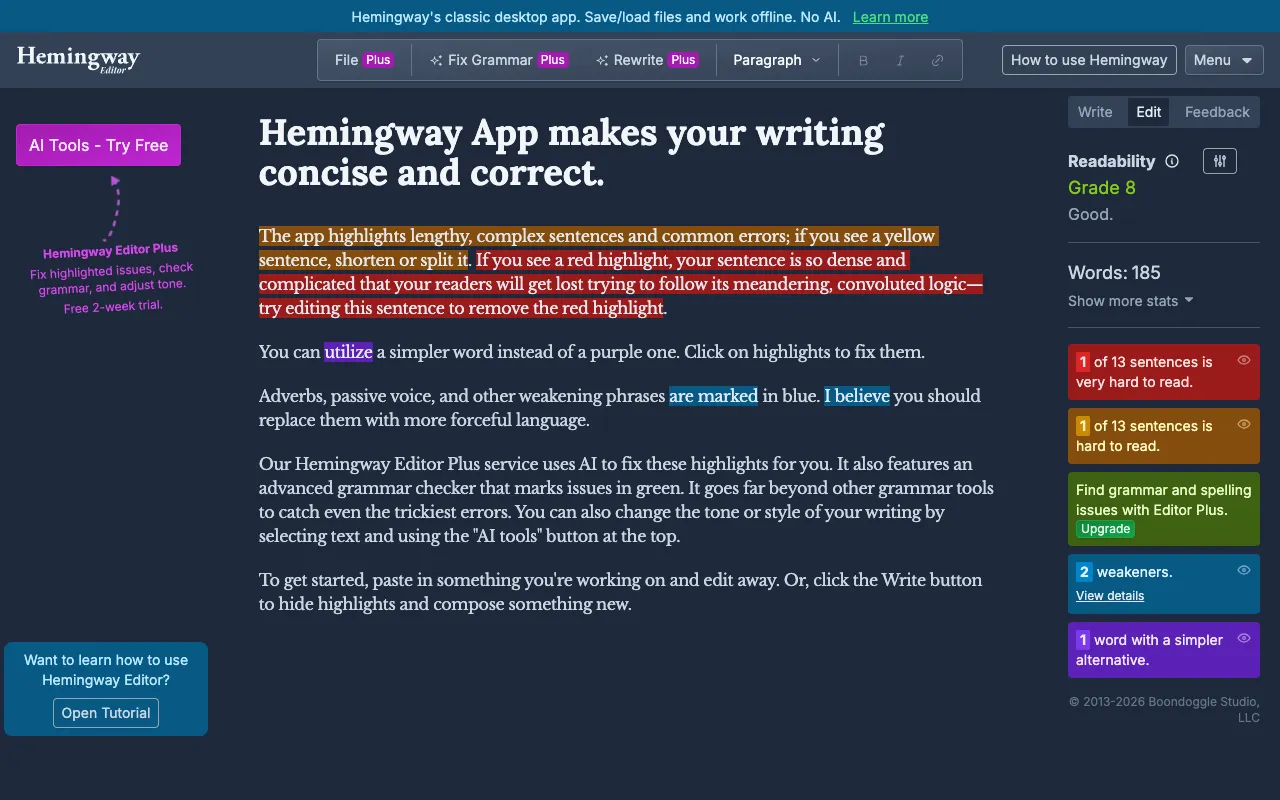
Hemingway Editor is a free, web-based application designed to make your writing bold and clear. Named after the famously concise author Ernest Hemingway, its core purpose is to analyze your text and identify elements that reduce readability. It provides an instant readability score and uses color-coded highlights to flag complex sentences, passive voice, adverbs, and hard-to-read phrases. The tool is built for writers, editors, and especially bloggers who need to communicate ideas effectively without getting bogged down by jargon or convoluted sentence structures.
Key Features of Hemingway Editor
Readability Score & Grade Level
Hemingway provides an instant readability grade (like Grade 6, 8, 10+). For bloggers, aiming for a Grade 6-8 readability ensures your content is accessible to the widest possible audience, improving comprehension and reducing bounce rates.
Sentence Complexity Highlighting
The tool highlights long, complex sentences in yellow and very hard-to-read sentences in red. This visual feedback helps you break down dense paragraphs into digestible chunks, a key factor for online reading habits and SEO-friendly content structure.
Adverb & Passive Voice Detection
Hemingway flags unnecessary adverbs (in blue) and uses of passive voice (in green). Reducing these makes your writing more direct, confident, and active, which increases the persuasive power and authority of your blog posts.
Word Count & Formatting Tools
Beyond analysis, Hemingway includes a distraction-free writing mode, word/character count, and one-click formatting for bold, italics, headlines, and lists. It's a minimalist writing studio that keeps you focused on clarity.
Who Should Use Hemingway Editor?
Hemingway Editor is ideal for content creators who prioritize clarity and engagement. Primary users include: professional bloggers and content marketers aiming to improve SEO through better readability; freelance writers who need to self-edit before submitting work; non-native English speakers writing for an English-speaking audience; students and academics looking to simplify complex ideas; and business owners crafting clear website copy, emails, or reports. Any writer who wants their message to be understood quickly and easily will benefit.
Hemingway Editor Pricing and Free Tier
Hemingway Editor offers a powerful and completely free web-based version accessible through any browser at HemingwayApp.com. This free tier includes all core analysis features: readability scoring, sentence highlighting, adverb and passive voice detection, and basic formatting. For users who need offline access or desktop software, a one-time purchase of the Hemingway Editor Desktop app is available for a flat fee. For most bloggers, the free web app provides all the functionality needed to significantly improve their writing quality at no cost.
Common Use Cases
- Editing blog posts for better SEO and reader engagement
- Simplifying technical or academic content for a general audience
- Improving email newsletter readability and conversion rates
- Self-editing freelance writing assignments before client submission
Key Benefits
- Creates more readable content that keeps visitors on your blog longer
- Helps you write in an active, confident voice that builds authority
- Improves your overall writing skill by teaching you to spot weak phrasing
- Saves editing time with instant, visual feedback on complex sentences
Pros & Cons
Pros
- Completely free web version with no sign-up required
- Instant, color-coded visual feedback is intuitive and easy to understand
- Directly targets elements that harm online readability and SEO
- Minimalist, distraction-free interface perfect for focused editing
Cons
- The desktop app requires a one-time purchase for offline use
- As a rule-based tool, it may occasionally flag stylistically intentional sentences
- Lacks advanced grammar checking or spelling correction features
Frequently Asked Questions
Is Hemingway Editor free to use?
Yes, the core Hemingway Editor is completely free to use online at HemingwayApp.com. You do not need to create an account or sign up. The web version includes all essential features for analyzing and improving readability. A paid desktop version is available for offline use, but the free web app is fully functional for bloggers.
Is Hemingway Editor good for SEO?
Absolutely. Hemingway Editor is excellent for SEO because it directly improves content readability, a confirmed ranking factor. Clear, concise content leads to lower bounce rates, longer dwell times, and better user engagement signals—all of which search engines reward. By simplifying sentence structure and using active voice, you create content that is easier for both readers and Google's algorithms to understand.
What is a good Hemingway readability score for a blog?
For most blogs targeting a general audience, a Hemingway readability score of Grade 6 to Grade 8 is ideal. This corresponds to a reading level most adults can easily comprehend. Scores of Grade 9 or higher indicate your writing may be too complex, causing readers to work harder to understand your points. Aiming for lower grades helps make your content more accessible and shareable.
Conclusion
Hemingway Editor remains a top-tier, essential tool for any serious blogger. Its unique value lies in transforming the abstract goal of 'clear writing' into a concrete, visual editing process. By forcing you to confront complex sentences and passive constructions, it not only improves your current blog post but actively trains you to become a better writer over time. For a tool that is both powerful and perpetually free, it offers an unmatched return on investment in the quality and impact of your content. If you want your blog to communicate with authority and clarity, make Hemingway Editor your final stop before hitting 'publish.'