Go back
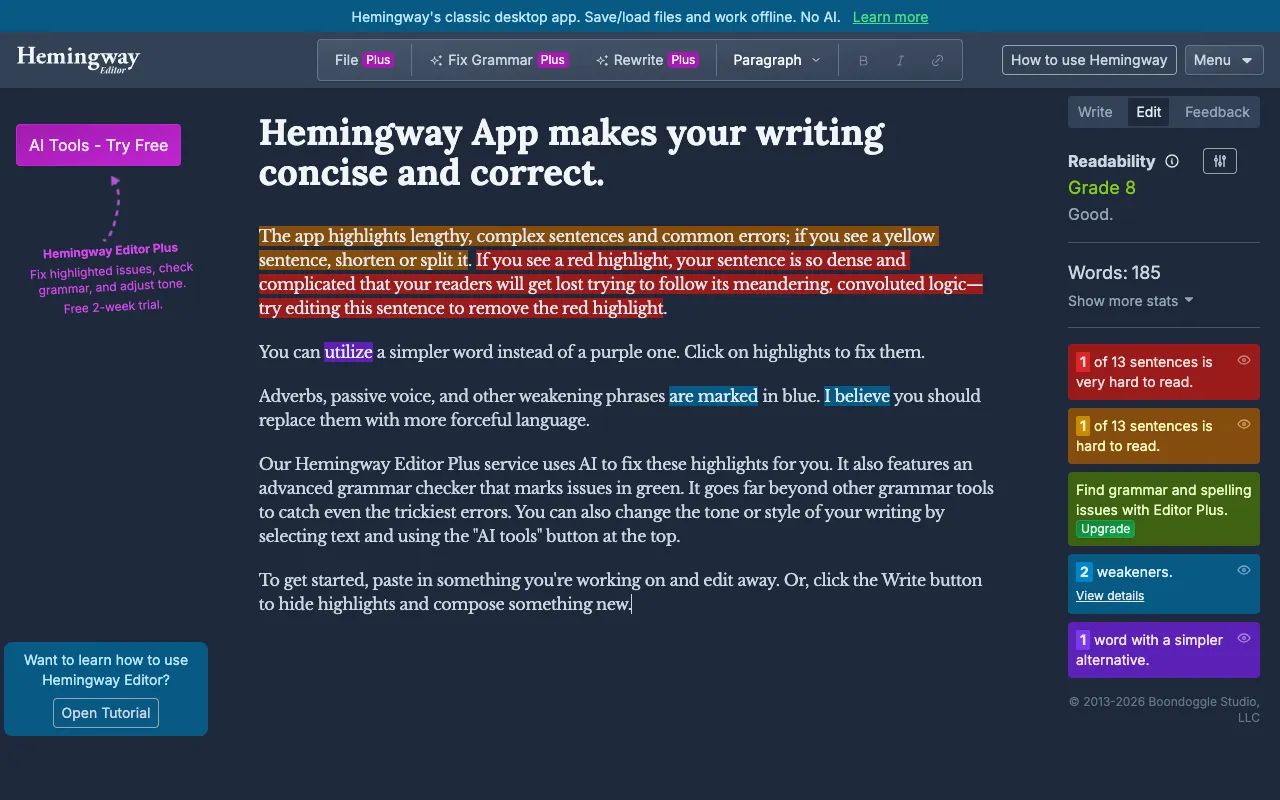
Image of Hemingmy Editor – The Best Readability Tool for Content Marketers

Hemingmy Editor – The Best Readability Tool for Content Marketers

Hemingway Editor is an indispensable writing assistant for content marketers who need to produce clear, persuasive, and engaging copy. It goes beyond basic grammar checks by analyzing your text's readability in real-time, highlighting complex sentences, unnecessary adverbs, and passive voice constructions that can weaken your message. By forcing you to write with boldness and clarity—much like its namesake—this tool helps you craft marketing content that converts, ranks better in search, and resonates with your audience.

What is Hemingway Editor?

Hemingway Editor is a specialized web and desktop application focused solely on improving writing clarity and readability. It acts as a digital editor that scans your text and visually flags stylistic issues that make prose difficult to read. Unlike spell-checkers, Hemingway targets the structure of your sentences, encouraging you to write with simplicity and directness. It's built on the principle that clear writing is effective writing, making it a critical tool for bloggers, copywriters, SEO specialists, and any marketer who communicates through the written word.

Key Features of Hemingway Editor

Readability Score & Grade Level

Hemingway provides an instant readability grade level (aiming for Grade 6-9 for most web content) and a color-coded score. This helps you objectively measure how easy your content is to digest, ensuring it's accessible to your target audience and aligns with SEO best practices for user engagement.

Sentence Complexity Highlighting

The tool highlights long, complex sentences in yellow and very hard-to-read sentences in red. This visual feedback allows you to quickly identify and break down run-on sentences or convoluted phrasing, transforming them into concise, impactful statements that hold reader attention.

Adverb & Weak Language Detection

Unnecessary adverbs are highlighted in blue. Hemingway encourages you to use stronger verbs instead, helping you create more vivid and authoritative marketing copy. Phrases that can be simplified (like 'in order to' to 'to') are marked in purple, pushing you toward more direct language.

Passive Voice Identifier

Instances of passive voice are highlighted in green. While sometimes useful, passive voice often weakens prose and obscures responsibility. Hemingway helps you spot it so you can choose active, energetic sentences that drive your marketing message forward with confidence.

Formatting & Publishing Tools

Beyond analysis, Hemingway includes clean formatting options. You can write in its distraction-free editor, then format headings, bold/italic text, and bullet points with Markdown or buttons. It also allows direct publishing to Medium or exporting to WordPress or PDF, streamlining your content workflow.

Who Should Use Hemingway Editor?

Hemingway Editor is ideal for any professional whose success depends on clear communication. This includes content marketers crafting blog posts and articles, SEO writers optimizing for user intent, copywriters developing ad and landing page copy, social media managers writing engaging captions, and business owners communicating directly with customers. It's particularly valuable for non-native English speakers and teams aiming to maintain a consistent, clear brand voice across all channels.

Hemingway Editor Pricing and Free Tier

Hemingway Editor offers an excellent free tier through its web application at hemingwayapp.com. The free version provides full access to all core readability analysis features, including sentence highlighting, adverb detection, passive voice checks, and the readability grade. For users who need offline access and more advanced formatting/publishing options, a one-time purchase for the Hemingway Editor Desktop app is available for Windows and macOS. This affordable pricing model makes professional-grade editing accessible to everyone.

Common Use Cases

Key Benefits

Pros & Cons

Pros

  • Free web version includes all core readability analysis tools
  • Provides immediate, actionable visual feedback to improve writing
  • Focuses exclusively on clarity and style, complementing grammar checkers
  • Simple, intuitive interface with no steep learning curve
  • Desktop app offers a one-time purchase model, not a subscription

Cons

  • Does not check for spelling or complex grammatical errors (should be used alongside a tool like Grammarly)
  • Can be overly strict; sometimes a complex sentence or adverb is stylistically appropriate
  • The desktop app requires a separate purchase for offline use

Frequently Asked Questions

Is Hemingway Editor free to use?

Yes, the core Hemingway Editor is completely free to use online at hemingwayapp.com. The free web version provides full access to all its famous readability analysis features, including sentence highlighting, adverb detection, and passive voice checks. A paid desktop version is available for a one-time fee for those who need offline access and advanced export options.

Is Hemingway Editor good for SEO content writing?

Absolutely. Hemingway Editor is one of the best tools for SEO content writing. Search engines like Google prioritize content that is helpful, easy to read, and matches user intent. By helping you write clear, concise, and readable copy, Hemingway directly contributes to better user engagement metrics (like dwell time), which can positively influence your SEO rankings. It ensures your content is accessible to a wide audience.

What is a good Hemingway readability score for blogs?

For most blogs and general web content, aim for a Hemingway readability grade of 6 to 9. This corresponds to plain English that is easy for a broad audience to understand. A lower grade (like 5-6) is excellent for maximum accessibility, while grades 10+ are often too complex for casual online reading. The tool's color highlights provide more granular feedback than the grade alone.

Can Hemingway Editor replace Grammarly or ProWritingAid?

Not entirely. Hemingway Editor specializes in readability and style (clarity, sentence structure). Tools like Grammarly or ProWritingAid focus more on grammar, spelling, punctuation, and sometimes plagiarism. For the best results, content marketers should use Hemingway first to achieve clarity and boldness, then use a grammar checker to polish the technical details. They are powerful complementary tools.

Conclusion

For content marketers, clarity isn't just a stylistic choice—it's a conversion tool. Hemingway Editor provides a focused, powerful, and accessible solution to the single biggest challenge in marketing writing: making complex ideas simple and persuasive. Its unique emphasis on bold, clear prose helps you cut through the noise, connect with your audience, and achieve your marketing goals. Whether you use the robust free web version or the desktop app, integrating Hemingway into your editing process is one of the highest-ROI decisions you can make for your content quality and performance.