Hemingway Editor – The Best Writing Tool for Freelance Writers
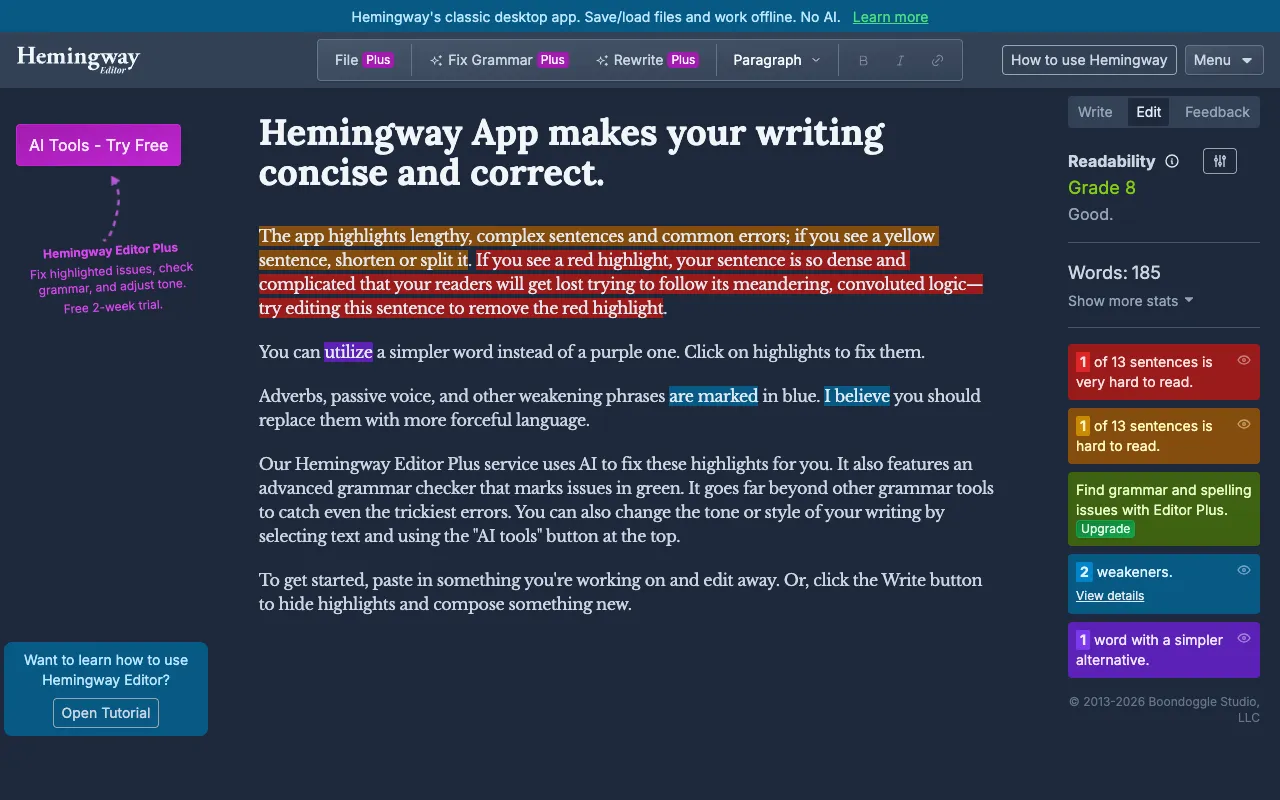
Hemingway Editor is an essential writing assistant designed to make your prose bold, clear, and easy to read. By instantly highlighting hard-to-read sentences, unnecessary adverbs, and passive voice, it helps freelance writers, bloggers, and content creators produce polished, professional work that engages audiences and satisfies clients. Unlike generic grammar checkers, Hemingway focuses on style and readability, transforming complex drafts into concise, powerful communication.
What is the Hemingway Editor?
The Hemingway Editor is a dedicated writing analysis tool that acts as your digital editor. Its core purpose is to improve the clarity and strength of your writing by identifying stylistic issues that weaken prose. It's built for writers who want to move beyond basic spelling and grammar to master readability—making it ideal for freelance writers crafting articles, blog posts, marketing copy, and reports. The tool provides immediate visual feedback, grading your writing's readability and suggesting concrete improvements.
Key Features of Hemingway Editor
Readability Score & Grade Level
Hemingway assigns a readability grade level (like Grade 6 or Grade 10) and highlights sentences that are hard or very hard to read. This helps you tailor complexity to your target audience, ensuring your freelance work is accessible and engaging.
Complex Sentence Highlighter
The tool automatically highlights long, complex sentences in yellow or red. This visual cue prompts you to break them down, improving flow and preventing reader fatigue—a key factor for SEO-friendly content and reader retention.
Adverb & Weak Language Detection
Hemingway flags unnecessary adverbs (highlighted in blue) and instances of passive voice (highlighted in green). This encourages stronger, more active writing, which builds authority and persuasiveness in your freelance projects.
Formatting & Direct Publishing
Beyond analysis, Hemingway includes basic formatting tools (headings, lists, links) and allows direct publishing to Medium or export to WordPress or PDF. This streamlines your workflow from editing to publication.
Who Should Use Hemingway Editor?
Hemingway Editor is perfect for freelance writers, content marketers, bloggers, students, and business professionals. It's especially valuable for those writing web content, where clarity and scannability are critical for SEO and user experience. If you write client reports, marketing emails, technical documentation, or creative nonfiction, Hemingway helps you eliminate fluff and communicate your ideas with power and precision.
Hemingway Editor Pricing and Free Tier
Hemingway Editor offers a robust, fully-featured free tier accessible directly via their website. The free web version provides all core analysis features (readability scoring, highlighting of complex sentences, adverbs, and passive voice). For users who prefer offline access or desktop integration, a one-time purchase of the Hemingway Editor Desktop app is available for Windows and macOS, which includes additional features like saving and editing documents directly.
Common Use Cases
- Improving blog post readability for higher SEO rankings and engagement
- Simplifying technical or academic writing for a general audience
- Polishing marketing copy and sales pages for better conversion rates
- Editing client deliverables to ensure clarity and professional quality
Key Benefits
- Produce clearer, more persuasive writing that clients and readers love
- Reduce editing time with instant visual feedback on style issues
- Write with confidence knowing your content is accessible to your target audience
- Strengthen your freelance writing portfolio with consistently polished work
Pros & Cons
Pros
- Completely free web version with all essential features
- Instant, color-coded visual feedback simplifies the editing process
- Focuses on readability and style, not just grammar
- No word limit in the free online editor
- Desktop app available for offline use with a one-time fee
Cons
- Does not check for spelling errors or advanced grammatical mistakes
- The style suggestions are rules-based and may not fit every creative context
- The desktop app requires a separate purchase
Frequently Asked Questions
Is Hemingway Editor free to use?
Yes, the core Hemingway Editor is completely free to use online at hemingwayapp.com. It provides full access to readability scoring, sentence highlighting, and passive voice detection without any subscription. A paid desktop version is available for offline use.
Is Hemingway Editor good for freelance writers?
Absolutely. Hemingway Editor is one of the best tools for freelance writers. It helps you quickly polish drafts, meet client expectations for clear communication, and produce content that is easy to read—directly impacting client satisfaction and repeat business.
What's the difference between Hemingway Editor and Grammarly?
While Grammarly focuses on comprehensive grammar, spelling, punctuation, and tone checking, Hemingway Editor specializes in readability and stylistic strength. Hemingway highlights sentence complexity and weak language to make your writing bold and clear. Many freelance writers use both: Grammarly for correctness and Hemingway for power and clarity.
What is a good Hemingway readability score?
For most web content and general audience freelance writing, aim for a Grade 6 to Grade 8 readability score. This indicates your writing is clear and accessible. A lower grade level (like Grade 5) is excellent for very broad audiences, while higher levels (Grade 10+) may be suitable for specialized or academic audiences.
Conclusion
For freelance writers committed to delivering exceptional, clear, and impactful content, Hemingway Editor is a non-negotiable tool in your arsenal. It goes beyond basic proofreading to strengthen the very core of your writing style. By making complex sentences simple and weak language strong, it ensures your work stands out for its clarity and professionalism. Use the free web app to refine every article, report, and piece of copy you write, and watch your client feedback and writing confidence soar.