Go back
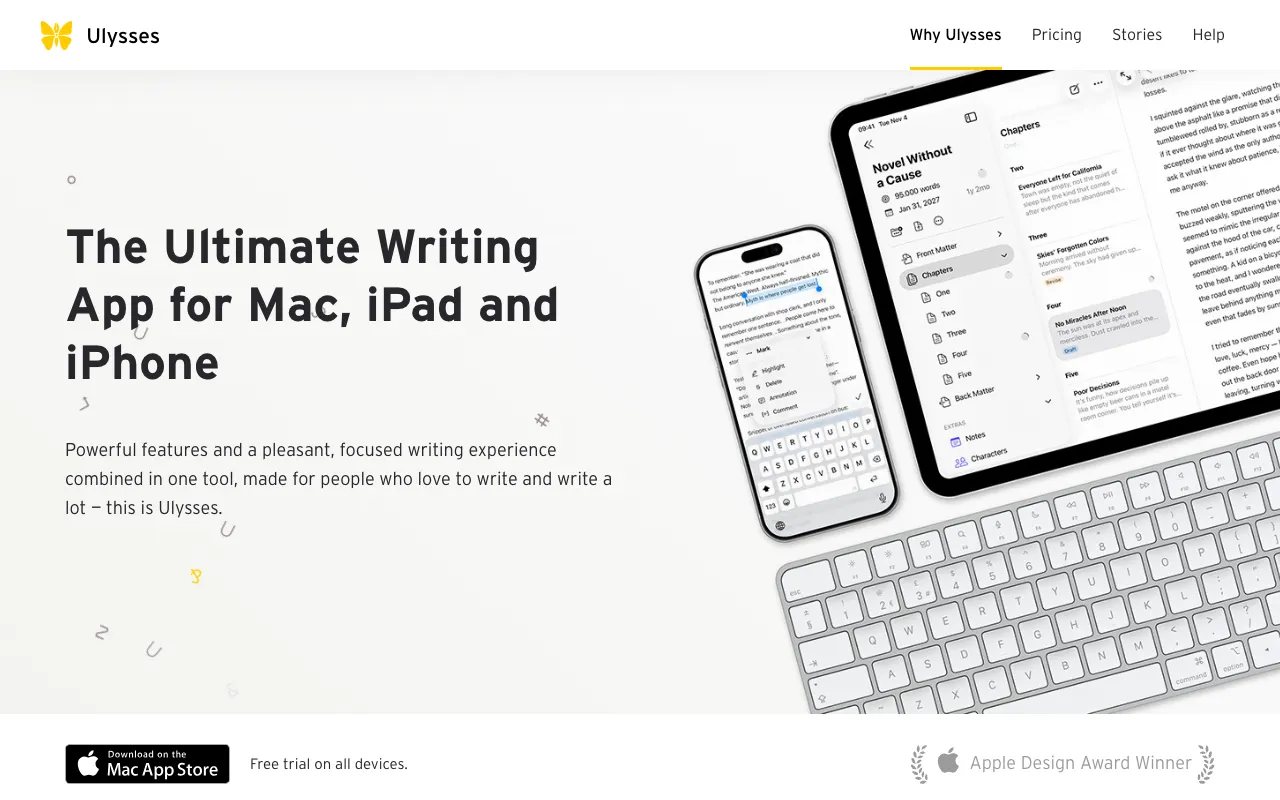
Image of Ulysses – The Best Writing App for Freelance Writers

Ulysses – The Best Writing App for Freelance Writers

Ulysses is the definitive writing environment for serious freelance writers, bloggers, and authors on macOS and iOS. More than just a text editor, it's a unified workspace that eliminates distractions, organizes complex projects, and streamlines publishing—all within an elegant, minimalist interface. Designed for those who write for a living, Ulysses transforms your writing process from a scattered chore into a focused, productive workflow, helping you meet deadlines and produce higher-quality work.

What is the Ulysses Writing App?

Ulysses is a powerful, subscription-based writing application exclusive to Apple's ecosystem. Its core philosophy is 'focus without friction.' It replaces cluttered folders and multiple files with a unified library where all your writing—from quick notes to book manuscripts—lives in one place. By combining a stark, customizable writing interface with robust organizational features like sheets, groups, and keywords, Ulysses provides a sanctuary for deep work. It's specifically engineered for writers who need to manage multiple clients, projects, and drafts while maintaining a clear headspace for the actual act of writing.

Key Features of Ulysses for Freelancers

Distraction-Free, Customizable Editor

The Ulysses editor is a blank canvas designed for immersion. You can hide all interface elements, choose from various themes (including dark mode), and set typewriter scrolling or focus mode to highlight only the current line or paragraph. This eliminates visual noise, allowing freelance writers to concentrate solely on their words and flow, which is crucial for hitting daily word counts and maintaining creative momentum.

Powerful Project & Document Organization

Manage all your freelance work in one app. Instead of files, you work with 'Sheets' that can be nested into 'Groups' (like folders). Use keywords and filters to instantly sort articles by client, status (draft, submitted, published), or topic. This system means you can jump between a blog post for Client A and a white paper for Client B in seconds, keeping your entire professional writing portfolio organized and accessible.

Built-In Goals & Writing Statistics

Stay on track with built-in productivity tools. Set word, character, or paragraph goals for any document or group. Ulysses displays a live progress bar and celebratory confetti when you hit your target—a simple but effective motivator for meeting article lengths and deadlines. Detailed statistics help you analyze your writing habits and output over time.

Seamless Publishing & Export

Publish or export your finished work without ever leaving the app. Ulysses supports one-click publishing to WordPress, Medium, Ghost, and Micro.blog with properly formatted text and images. For other needs, export to a wide range of formats including PDF, Word, ePub, and HTML, with beautiful, customizable styles. This streamlines the final delivery step for freelance writers, saving valuable time.

Full Markdown Support & Quick Export Preview

Write efficiently using a gentle, enhanced Markdown XL syntax. You see clean, formatted text as you write, not cryptic symbols. The instant preview feature lets you see exactly how your document will look when published or exported, ensuring no formatting surprises for you or your clients before final delivery.

Who Should Use Ulysses?

Ulysses is the ideal tool for professional writers who value focus and organization. It's perfect for freelance bloggers, content creators, journalists, copywriters, and novelists who work across multiple projects and need a centralized, clutter-free hub. If you're frustrated by juggling Notes app snippets, scattered Word documents, and cumbersome publishing workflows, Ulysses provides a cohesive solution. It's especially valuable for writers who publish directly to blogs or platforms and those who work across both a Mac and an iPad/iPhone.

Ulysses Pricing and Subscription Model

Ulysses operates on a subscription model, ensuring continuous updates and sync across all your Apple devices. It does not offer a traditional free tier, but a generous 14-day free trial is available for new users to test all features fully. After the trial, it requires a monthly or annual subscription. This model guarantees access to the latest features, robust iCloud sync, and reliable cross-device performance, making it a professional investment for writers who depend on their tools daily.

Common Use Cases

Key Benefits

Pros & Cons

Pros

  • Unmatched focus-oriented writing environment reduces distractions
  • Superior organizational system for managing dozens of writing projects
  • Flawless iCloud sync and native performance on all Apple devices
  • Direct publishing integration saves significant time for bloggers

Cons

  • Subscription-only model with no one-time purchase option
  • Exclusively available for macOS and iOS, no Windows or Android support
  • Learning curve for writers new to its library-based organizational system

Frequently Asked Questions

Is Ulysses free to use?

Ulysses is not a free application. It operates on a subscription model after a full-featured 14-day free trial. This ensures you get continuous updates, new features, and reliable iCloud sync, positioning it as a professional tool for serious writers.

Is Ulysses good for freelance writers?

Absolutely. Ulysses is one of the best tools for freelance writers on Apple devices. Its combination of distraction-free writing, powerful project management for multiple clients, and seamless publishing directly addresses the core needs of a professional freelancer: focus, organization, and efficient delivery.

Can I use Ulysses on Windows or Android?

No, Ulysses is exclusively developed for and available on Apple's ecosystem: macOS, iPadOS, and iOS. This allows for deep integration and optimized performance but means it is not an option for writers using Windows or Android devices.

How does Ulysses compare to Scrivener or Google Docs?

Ulysses offers a more streamlined and focused experience than Scrivener, which is better for highly complex, research-heavy manuscripts. Compared to Google Docs, Ulysses provides superior offline performance, a truly distraction-free interface, and much more powerful organization and publishing features, making it a dedicated writing tool rather than a collaborative document editor.

Conclusion

For the freelance writer invested in the Apple ecosystem, Ulysses is not just another app—it's a professional-grade writing studio. It addresses the fundamental challenges of the trade: maintaining creative focus amidst chaos, organizing a multifaceted workload, and delivering polished content efficiently. While the subscription model requires an ongoing investment, the productivity gains, reduced friction, and sheer joy of writing in a crafted environment deliver significant returns for anyone who writes for a living. If your goal is to write more, stress less, and present your work professionally, Ulysses stands as a top-tier solution.