Go back
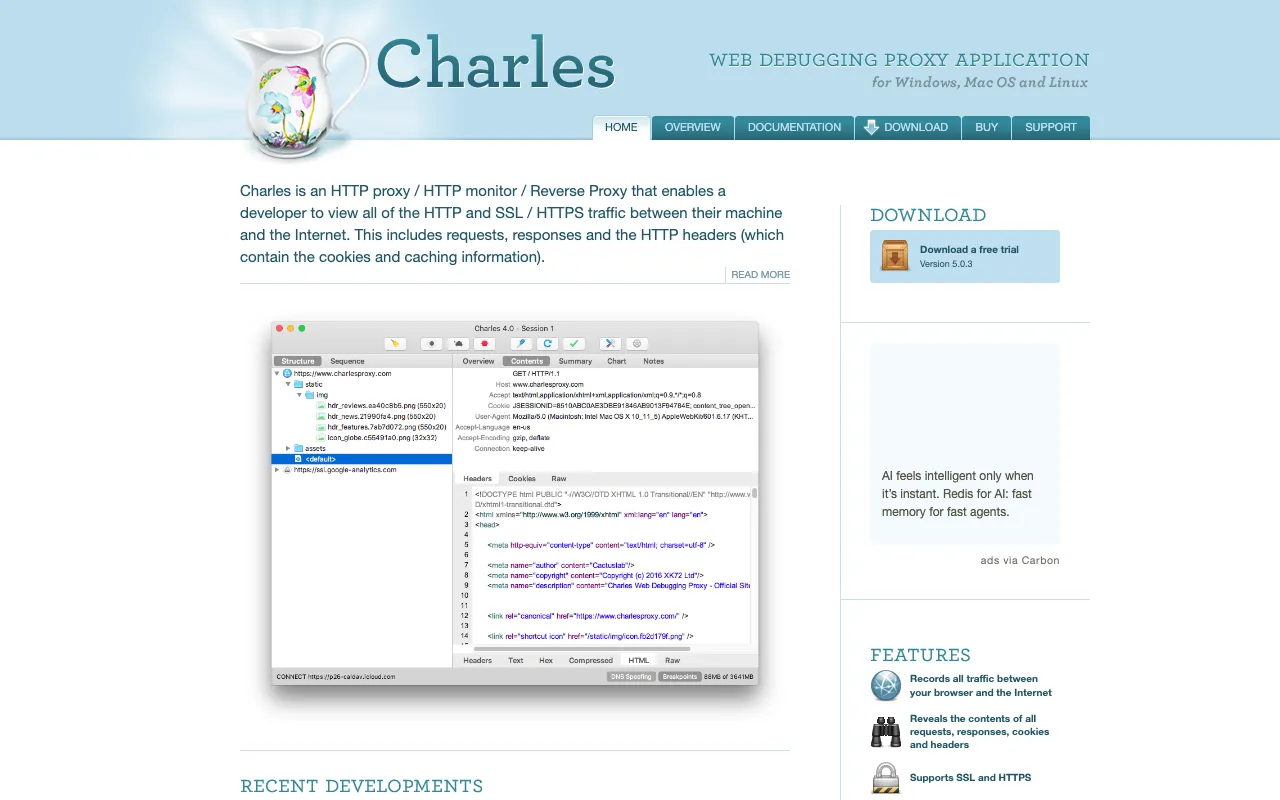
Image of Charles Proxy – The Essential HTTP Debugging Tool for Mobile App Developers

Charles Proxy – The Essential HTTP Debugging Tool for Mobile App Developers

Charles Proxy is the industry-standard HTTP/SSL proxy monitor that provides mobile app developers with unparalleled visibility into network traffic. Whether you're debugging API calls on iOS, analyzing Android app performance, or testing backend services, Charles Proxy gives you the power to inspect every request and response in real-time. As a desktop application trusted by development teams globally, it solves the critical challenge of understanding what happens between your mobile app and the internet.

What is Charles Proxy?

Charles Proxy is a sophisticated, cross-platform desktop application that acts as an intermediary between your mobile device and the internet. It captures all HTTP and HTTPS traffic, allowing developers to see the raw data being sent and received by their applications. Unlike browser developer tools, Charles Proxy provides a comprehensive view of traffic from any app on your device, making it indispensable for mobile development, API testing, and performance optimization. It transforms the 'black box' of network communication into a transparent, analyzable stream of data.

Key Features of Charles Proxy

SSL Proxying & Decryption

Charles Proxy can decrypt and inspect HTTPS traffic, a critical feature for modern apps. It acts as a 'man-in-the-middle' with trusted certificates, allowing you to see the contents of encrypted requests and responses, debug SSL handshakes, and verify secure connections in your iOS or Android application.

Request & Response Inspection

View the complete structure of every API call. Inspect headers, query parameters, cookies, status codes, and response bodies (JSON, XML, HTML, images). The formatted and syntax-highlighted view makes it easy to identify malformed data, incorrect headers, or unexpected server responses.

Bandwidth Throttling & Network Conditions

Simulate real-world network environments directly from your desktop. Throttle bandwidth to 3G or Edge speeds, introduce latency, and simulate packet loss to test how your mobile app performs under poor network conditions—essential for ensuring a robust user experience.

Breakpoints & Modify Requests

Intercept requests and responses on the fly. Set breakpoints to pause traffic, then modify any part of a request (URL, headers, body) before it's sent, or alter a server response before it reaches your app. This is invaluable for testing edge cases and error handling without changing backend code.

Repeat & Advanced Repeat

Re-send any captured request with a single click. The Advanced Repeat feature allows you to stress-test endpoints by sending a request multiple times concurrently, helping you identify performance bottlenecks and concurrency issues in your backend services.

Map Local & Remote Tools

Map requests from your live mobile app to local files on your machine. This allows you to test new API responses or frontend assets without deploying changes to a staging server, dramatically speeding up the development and testing cycle.

Who Should Use Charles Proxy?

Charles Proxy is essential for any professional involved in building or maintaining mobile applications. iOS and Android developers use it daily to debug API integrations and network issues. QA engineers rely on it to validate data integrity and test app behavior under various network scenarios. Backend developers utilize it to inspect the precise calls made by mobile clients. Even product managers and designers can benefit from understanding the data flows within their app. If your work touches a mobile app that communicates with the internet, Charles Proxy is a fundamental tool in your toolkit.

Charles Proxy Pricing and Free Tier

Charles Proxy operates on a generous free trial model. You can download and use the full-featured application completely free for 30 days, with no functional restrictions—perfect for evaluating its capabilities on a real project. After the trial, a license is required for continued use. Licensing is per-user and includes free updates for the life of the major version. This model ensures developers can thoroughly integrate it into their workflow before making a purchase, and the one-time fee provides long-term value compared to subscription-based tools.

Common Use Cases

Key Benefits

Pros & Cons

Pros

  • Unmatched depth and clarity for inspecting HTTP/HTTPS traffic
  • Critical features like SSL decryption and bandwidth throttling are robust and reliable
  • Intuitive UI that organizes complex network data in an accessible way
  • One-time license fee provides excellent long-term value for professional developers
  • Extensive documentation and a large, established community for support

Cons

  • Requires manual certificate installation on mobile devices for HTTPS debugging, which can be a hurdle for beginners
  • As a desktop application, it cannot debug traffic on physical devices that are not on the same network (without complex setup)
  • The interface, while powerful, can feel dense for users completely new to network debugging concepts

Frequently Asked Questions

Is Charles Proxy free to use?

Yes, Charles Proxy offers a fully-featured 30-day free trial. After the trial period, you need to purchase a license for continued use. There is no permanently free version with limited features, but the trial provides ample time to evaluate its capabilities.

Is Charles Proxy good for mobile app development?

Absolutely. Charles Proxy is considered an essential tool for professional mobile app development. Its ability to debug traffic from real iOS and Android devices—including SSL decryption—makes it uniquely valuable for solving the complex network issues that arise in native and cross-platform mobile apps.

How does Charles Proxy compare to browser developer tools?

Browser dev tools are limited to traffic within the browser. Charles Proxy captures all HTTP/HTTPS traffic from your entire machine and any device you proxy through it (like a phone). This gives you a universal view, crucial for debugging mobile apps, desktop apps, and other services that don't run in a browser.

Can I use Charles Proxy to test API responses?

Yes, this is a primary use case. Using the Breakpoints and Map Local features, you can intercept a live API call and return a modified response from a local file. This allows you to test how your app handles different data, errors, or edge cases without touching the live backend server.

Conclusion

For mobile app developers, visibility is control. Charles Proxy provides that critical visibility into the network layer, transforming guesswork into precise debugging. While the initial setup for HTTPS inspection requires careful configuration, the payoff is a level of insight that few other tools can match. Its comprehensive feature set—from SSL proxying to network throttling—addresses the real-world challenges of modern app development. If you are serious about building robust, high-performance mobile applications that work flawlessly across all network conditions, investing time in learning Charles Proxy is not just recommended; it's a professional necessity. Start your free trial today and see the unseen traffic shaping your user's experience.