Go back
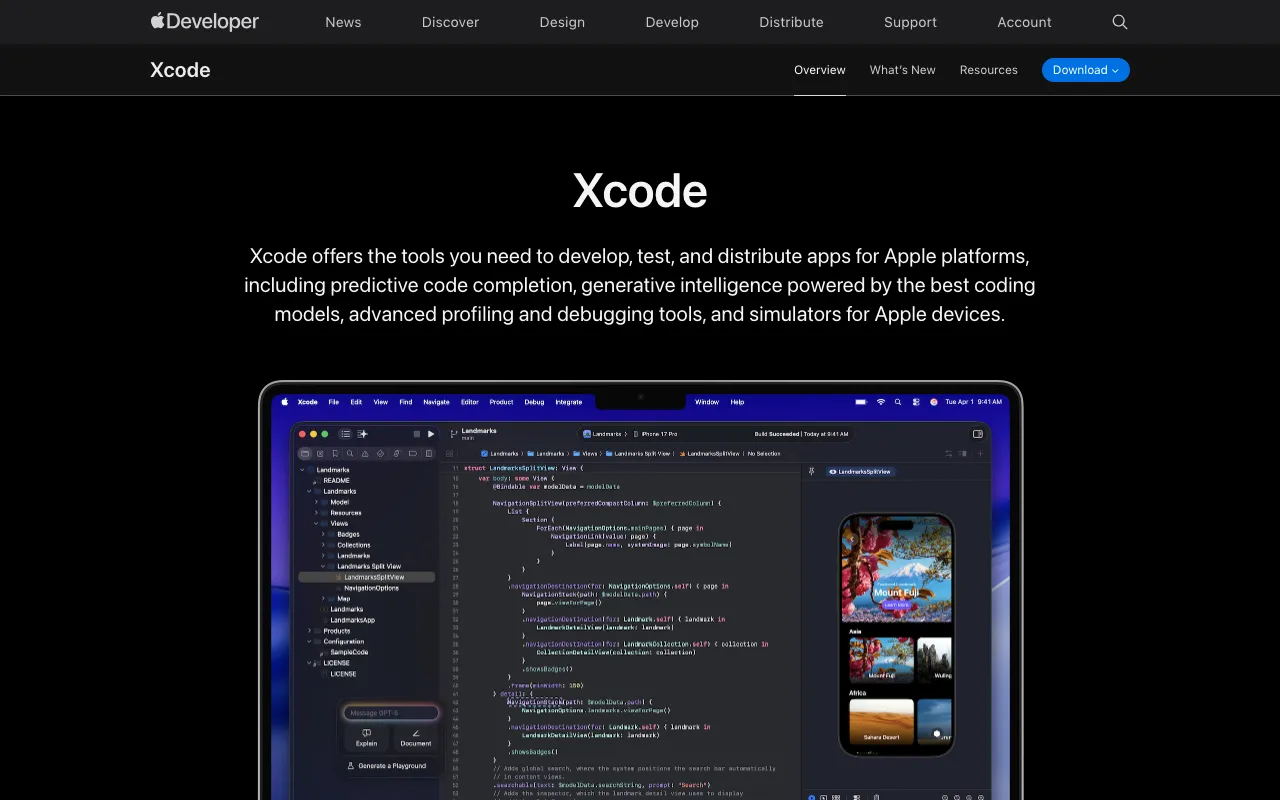
Image of Xcode – The Essential IDE for Apple Platform Development

Xcode – The Essential IDE for Apple Platform Development

Xcode is Apple's official, free Integrated Development Environment (IDE), designed exclusively for developers building applications across the Apple ecosystem. As the cornerstone tool for creating iOS, iPadOS, macOS, watchOS, and tvOS apps, Xcode provides a unified workflow for coding, interface design, testing, debugging, and App Store submission. It integrates seamlessly with Swift and Objective-C and is the primary platform for leveraging cutting-edge frameworks like SwiftUI and ARKit.

What is Xcode?

Xcode is Apple's proprietary development suite, offering a comprehensive set of tools for software creation across all Apple operating systems. More than just a code editor, it's a complete workflow manager that handles everything from writing Swift or Objective-C code and designing user interfaces with Interface Builder or SwiftUI to performance profiling, on-device testing with the iOS Simulator, and final deployment to the App Store. It is the mandatory environment for any developer targeting Apple's platforms, ensuring compatibility, performance, and access to the latest APIs and features directly from Apple.

Key Features of Xcode

SwiftUI and Interface Builder

Build modern, declarative user interfaces with SwiftUI's live preview canvas, or use the visual drag-and-drop Interface Builder for UIKit-based projects. Both tools allow for rapid prototyping and real-time visualization of UI changes across different device sizes and orientations.

Integrated iOS Simulator

Test your iOS, iPadOS, watchOS, and tvOS applications instantly without needing physical hardware. The simulator mimics various Apple devices, versions, and configurations, enabling fast iteration and debugging for different screen sizes and OS versions.

Powerful Debugging & Instruments

Identify and fix bugs efficiently with the LLVM debugger and view debugging. The Instruments profiler provides deep performance analysis for CPU, memory, energy, network, and graphics, helping you optimize app responsiveness and battery life.

Source Control & Project Management

Manage your project's source code with built-in Git integration, including branching, merging, and commit history directly within the IDE. The project navigator and new Swift Package Manager support streamline dependency management and code organization.

App Store Connect Integration

Seamlessly archive, sign, and upload your app binaries for TestFlight beta testing or public release on the App Store. Xcode automates code signing and provisioning profile management, simplifying the deployment process.

Who Should Use Xcode?

Xcode is indispensable for any developer or team creating software for Apple devices. This includes freelance iOS app developers, macOS desktop application builders, agencies developing client apps for the App Store, students learning Swift programming, and large enterprises building internal tools for Apple's ecosystem. If your goal is to publish an app on any Apple platform, Xcode is not just recommended—it's required.

Xcode Pricing and Free Tier

Xcode is completely free to download and use from the Mac App Store. There are no subscription fees or hidden costs for the core IDE, compiler, simulator, and debugging tools. To distribute apps on the App Store, you need an Apple Developer Program membership, which costs $99 USD per year. This program provides access to distribution certificates, App Store Connect, and beta testing via TestFlight.

Common Use Cases

Key Benefits

Pros & Cons

Pros

  • Official and free IDE from Apple with best-in-class platform integration.
  • Exclusive access to latest frameworks (SwiftUI, ARKit, Metal) and beta OS features.
  • Powerful, integrated toolchain (compiler, debugger, profiler, simulator) in one package.
  • Essential for App Store submission and code signing automation.

Cons

  • Only available on macOS, limiting development to Apple computers.
  • Can have a steep learning curve for beginners due to its extensive feature set.
  • Large download size and updates are frequent, requiring significant disk space.

Frequently Asked Questions

Is Xcode free to use?

Yes, Xcode is completely free to download and use from the Mac App Store. The core development environment, including the editor, simulators, and debugging tools, requires no payment. You only need to pay for an Apple Developer Program membership ($99/year) if you wish to publish an app on the App Store.

Is Xcode good for mobile app development?

Xcode is the industry-standard and essential tool for native iOS and iPadOS mobile app development. It is specifically optimized for building high-performance applications that integrate deeply with iPhone and iPad hardware and software. For cross-platform mobile development targeting Android as well, developers would need to supplement Xcode with other tools like Android Studio or a framework like Flutter.

What programming languages does Xcode support?

Xcode has primary, built-in support for Swift (Apple's modern programming language) and Objective-C. It also offers varying levels of support for other languages like C, C++, and assembly through its LLVM compiler infrastructure. For web development, it is not suitable as a primary editor.

Can I use Xcode on Windows or Linux?

No, Xcode is exclusively developed for and only runs on macOS. Developing for Apple platforms officially requires a Mac computer. Developers on Windows or Linux often use cloud-based Mac services or Hackintosh setups to access Xcode, but the native experience is only available on Apple hardware.

Conclusion

For any developer committed to building applications for Apple's ecosystem, Xcode is not merely a tool—it's the foundation. Its deep integration with macOS, exclusive access to cutting-edge frameworks like SwiftUI, and streamlined path from code to App Store make it irreplaceable. While its macOS-only requirement is a limitation, the power, stability, and official support it provides are unmatched for creating premium experiences on iOS, iPadOS, macOS, watchOS, and tvOS. For native Apple platform development, Xcode remains the definitive and essential choice.