Go back
Image of Darktable – The Best Free RAW Photo Editor for Photographers

Darktable – The Best Free RAW Photo Editor for Photographers

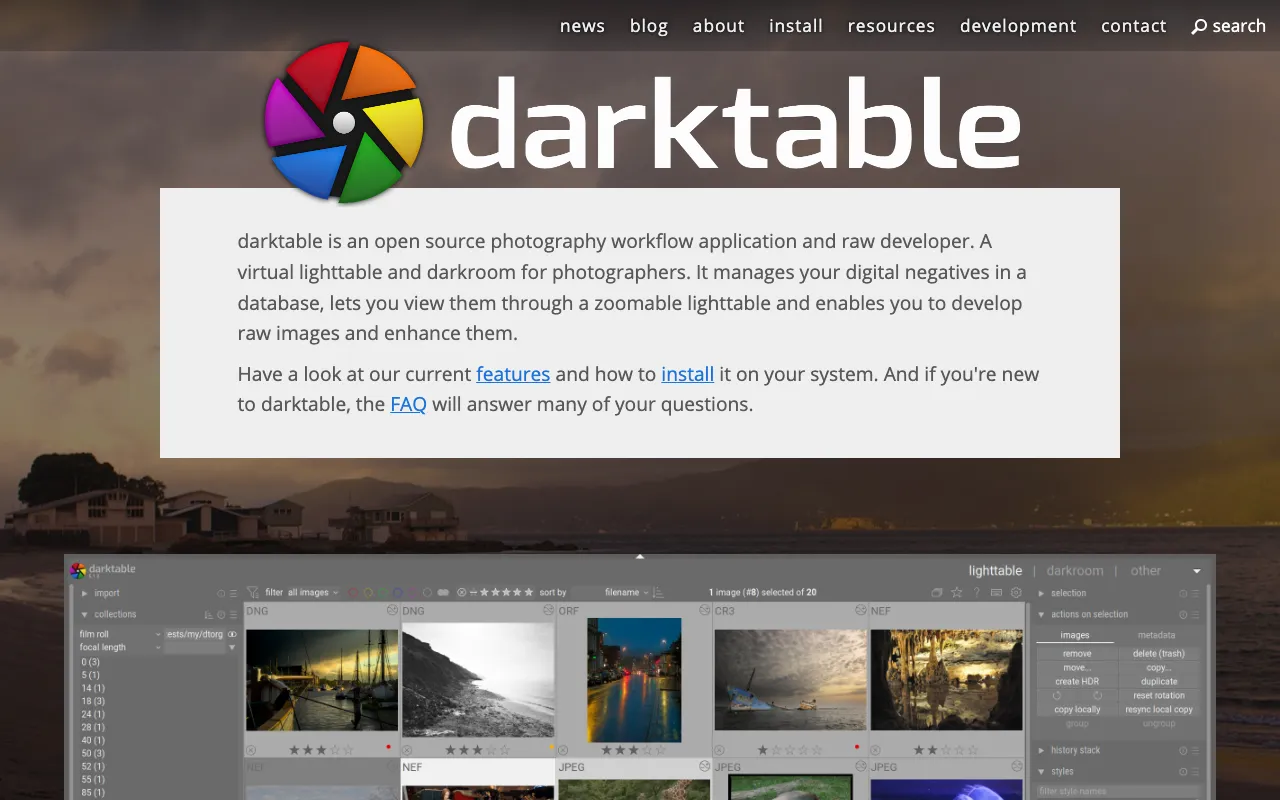
Darktable is a professional-grade, open-source photography application that empowers photographers to take complete control of their RAW image workflow. Unlike basic editors, Darktable is built from the ground up as a virtual lighttable and darkroom for managing thousands of photos and developing high-quality images from digital negatives. It provides a comprehensive, non-destructive editing environment that rivals costly commercial software, making it an indispensable tool for hobbyists, enthusiasts, and professional photographers who demand quality without the subscription fees.

What is Darktable?

Darktable is a dedicated open-source photography workflow application and RAW developer. Its core purpose is to serve as a complete digital darkroom, allowing photographers to import, organize, rate, tag, and perform sophisticated edits on their RAW files in a single, integrated environment. Built with a modular architecture, it supports a wide array of cameras and formats, offering deep control over every aspect of image development. It's specifically designed for photographers who shoot in RAW and want a powerful, free alternative to proprietary software like Adobe Lightroom and Capture One.

Key Features of Darktable

Non-Destructive Editing Pipeline

Every edit in Darktable is applied non-destructively. Your original RAW files remain untouched, allowing you to revert, tweak, or create multiple versions of an image at any time without losing quality. This provides ultimate creative freedom and safe experimentation.

Advanced RAW Processing Engine

Leverage state-of-the-art demosaicing, noise reduction, lens correction, and color science modules. Darktable's processing engine delivers exceptional detail, dynamic range, and color accuracy from your camera's RAW data.

Powerful Asset Management (Lighttable View)

Efficiently manage large photo libraries. Import, cull, rate, tag, and filter images using a flexible database system. The lighttable view provides powerful sorting and searching capabilities to streamline your workflow.

Extensive Module System for Fine-Tuning

Gain granular control with dozens of dedicated modules for exposure, tone mapping, color correction, sharpening, cropping, and creative effects like vignetting and film simulation. This modular approach allows for highly customized editing workflows.

Tethered Shooting Support

Connect your camera directly to your computer for tethered shooting. Capture images and have them imported and displayed in Darktable instantly, ideal for studio and controlled environment photography.

Who Should Use Darktable?

Darktable is the ideal solution for photographers at all levels who prioritize control, quality, and cost-efficiency. It is perfect for: Enthusiast photographers transitioning from JPEG to RAW who need powerful editing tools; Professional photographers seeking a free, open-source alternative to reduce software overhead; Hobbyists and students learning advanced photo editing techniques without financial barriers; Photographers who value data privacy and software freedom, as Darktable is open-source and runs locally on your machine.

Darktable Pricing and Free Tier

Darktable is completely free and open-source software (FOSS). There is no paid tier, subscription, or premium version. It is funded and developed by a global community of contributors. You can download and use all its professional features—from RAW development and asset management to advanced color grading—at absolutely no cost, forever.

Common Use Cases

Key Benefits

Pros & Cons

Pros

  • 100% free and open-source with no feature limitations.
  • Extremely powerful non-destructive editing and RAW processing capabilities.
  • Runs on Linux, macOS, and Windows, offering broad platform compatibility.
  • Actively developed with frequent updates and new features from a dedicated community.

Cons

  • The interface and workflow have a steeper learning curve compared to more commercial, simplified editors.
  • Lacks integrated cloud storage and syncing features found in subscription-based services.

Frequently Asked Questions

Is Darktable free to use?

Yes, Darktable is completely free and open-source. You can download, install, and use all its professional photography editing and management features without any cost, now or in the future.

Is Darktable good for professional photographers?

Absolutely. Darktable provides the advanced RAW processing, non-destructive workflow, and detailed control that professional photographers require. While it demands time to master, its output quality rivals paid alternatives, making it a powerful, cost-effective tool for professional work.

Can Darktable replace Adobe Lightroom?

For many photographers, yes. Darktable excels at RAW development and local asset management, covering the core functionalities of Lightroom's Develop and Library modules. However, it does not natively include Lightroom's cloud ecosystem, AI-powered features, or seamless integration with Photoshop. For photographers focused on deep, local editing of RAW files, Darktable is a formidable replacement.

Conclusion

Darktable stands as a pillar of the open-source creative community, delivering professional-grade photography tools to anyone with a camera and a computer. It removes the financial barrier to high-quality RAW editing, offering unparalleled control and a future-proof workflow free from subscription locks. If you are a photographer dedicated to mastering your craft and owning your entire post-processing pipeline, Darktable is not just a free alternative—it's a top-tier choice that empowers true creative independence.