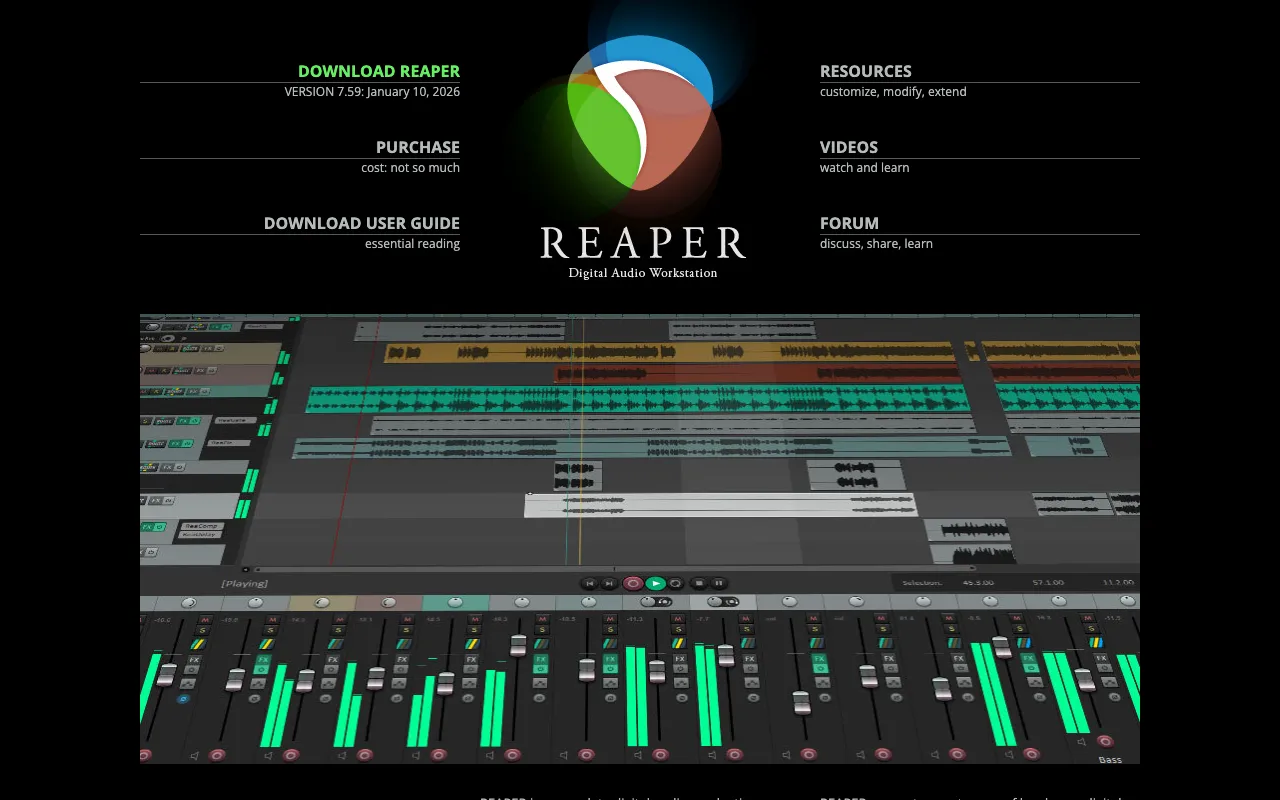
Reaper – The Best Digital Audio Workstation for Podcasters
Reaper stands out as a premier Digital Audio Workstation (DAW) specifically engineered for podcasters who demand professional-grade audio quality without the prohibitive cost. Unlike bloated competitors, Reaper combines a lean, lightning-fast architecture with virtually limitless customization, allowing you to tailor your editing environment to your exact podcasting workflow. Its comprehensive suite of recording, editing, and effects tools empowers creators to produce crystal-clear, engaging audio content efficiently.
What is Reaper DAW?
Reaper is a complete, professional digital audio production application. At its core, it's a powerful environment for multi-track recording, editing, processing, mixing, and mastering. For podcasters, this translates to a single, robust tool for recording interviews, editing out mistakes and pauses, adding music and sound effects, mixing voice levels, and exporting a polished final MP3 file. Its reputation is built on exceptional stability, minimal system resource usage, and an unparalleled degree of user customization, making it a favorite among savvy audio professionals who value efficiency and control.
Key Features of Reaper for Podcasters
Extensive Customization & Flexible Workflow
Reaper's interface is not fixed; it's a canvas. You can create custom toolbars, menus, layouts, and even scripting actions to automate repetitive podcast editing tasks. This means you can build an editing environment that mirrors your ideal podcast production process, drastically reducing editing time and mouse clicks.
Vast Built-in Effects & Processing Suite
Reaper comes loaded with a professional collection of high-quality audio effects (ReaPlugs). For podcasters, this includes essential tools like the ReaFIR noise reduction plugin for cleaning up room tone, ReaComp for smooth vocal compression, ReaEQ for tonal shaping, and ReaVerb for adding reverb to intro/outro music. There's no immediate need for expensive third-party plugins.
Non-Destructive, Sample-Accurate Editing
Edit your podcast audio with surgical precision. Split, move, fade, and crossfade clips without ever damaging the original recorded files. This non-destructive editing gives you the freedom to experiment and undo any change, ensuring you never lose a perfect take.
Efficient Multi-Track Recording & Routing
Easily record a host and multiple remote guests on separate tracks simultaneously. Reaper's powerful routing matrix allows you to send specific audio to different headphone mixes for your guests and apply effects on individual tracks or groups, providing complete control over every element of your podcast's sound.
Who Should Use Reaper for Podcasting?
Reaper is the ideal DAW for podcasters who have moved beyond basic editors and seek a professional, long-term solution. It's perfect for indie podcast producers, interview-based shows, narrative audio storytellers, and anyone who values a fast, reliable, and customizable editing workflow. While it has a slight learning curve, its power and affordability make it the smart choice for serious creators investing in the quality and efficiency of their podcast production.
Reaper Pricing and Free Trial
Reaper operates on a remarkably fair and affordable licensing model. A discounted license ($60) is available for individuals, small businesses, and educational use, while a commercial license is $225. Crucially, Reaper offers a fully-featured, uncrippled 60-day free trial, allowing you to thoroughly evaluate its capabilities for your podcast before purchasing. There is no recurring subscription fee—it's a one-time purchase with years of free updates.
Common Use Cases
- Editing long-form interview podcasts with multiple guest audio tracks
- Producing narrative podcasts with complex sound design and music beds
- Cleaning up noisy audio recordings from remote interviews or home studios
- Creating podcast templates with custom actions to speed up repetitive editing tasks
Key Benefits
- Achieve broadcast-quality audio production on a budget with a one-time purchase
- Dramatically reduce editing time through customizable workflows and automation
- Gain complete creative control over every aspect of your podcast's sound without plugin limitations
Pros & Cons
Pros
- Extremely affordable one-time license with no subscriptions
- Lightweight, stable, and runs efficiently on older computers
- Unmatched customization for tailoring the software to your podcast workflow
- Includes a comprehensive suite of professional-grade effects and utilities
Cons
- The default interface can feel less polished than some competitors, requiring initial setup
- The immense depth of features presents a steeper initial learning curve for absolute beginners
Frequently Asked Questions
Is Reaper free for podcasters?
Reaper is not freeware, but it offers a generous, fully-functional 60-day free trial. After the trial, an incredibly affordable one-time license is required for continued use, making it a low-cost, high-value investment for podcasters.
Is Reaper good for beginner podcasters?
Reaper is powerful for all levels but has a learning curve. Dedicated beginners can succeed with online tutorials, but those wanting the simplest possible start might prefer a more basic editor. For podcasters planning to grow and demand more control, learning Reaper early is a strategic advantage.
Can Reaper remove background noise from podcasts?
Yes, Reaper includes the ReaFIR plugin, a powerful tool for sampling and removing constant background noise like HVAC hum or computer fans, which is essential for achieving clean, professional-sounding podcast audio.
How does Reaper compare to Audacity for podcasting?
While Audacity is a simple, free editor, Reaper is a full Digital Audio Workstation. Reaper offers non-destructive editing, real-time effects, much better multi-track handling, customizability, and stability for complex projects, making it superior for serious, ongoing podcast production.
Conclusion
For podcasters seeking a professional, future-proof audio production tool that respects both their craft and their budget, Reaper is arguably the best value in the industry. Its combination of raw power, exceptional stability, and deep customization allows you to build an optimized podcast editing pipeline that grows with your show. The generous free trial removes all risk, inviting you to experience why Reaper has become the secret weapon for so many successful audio creators.