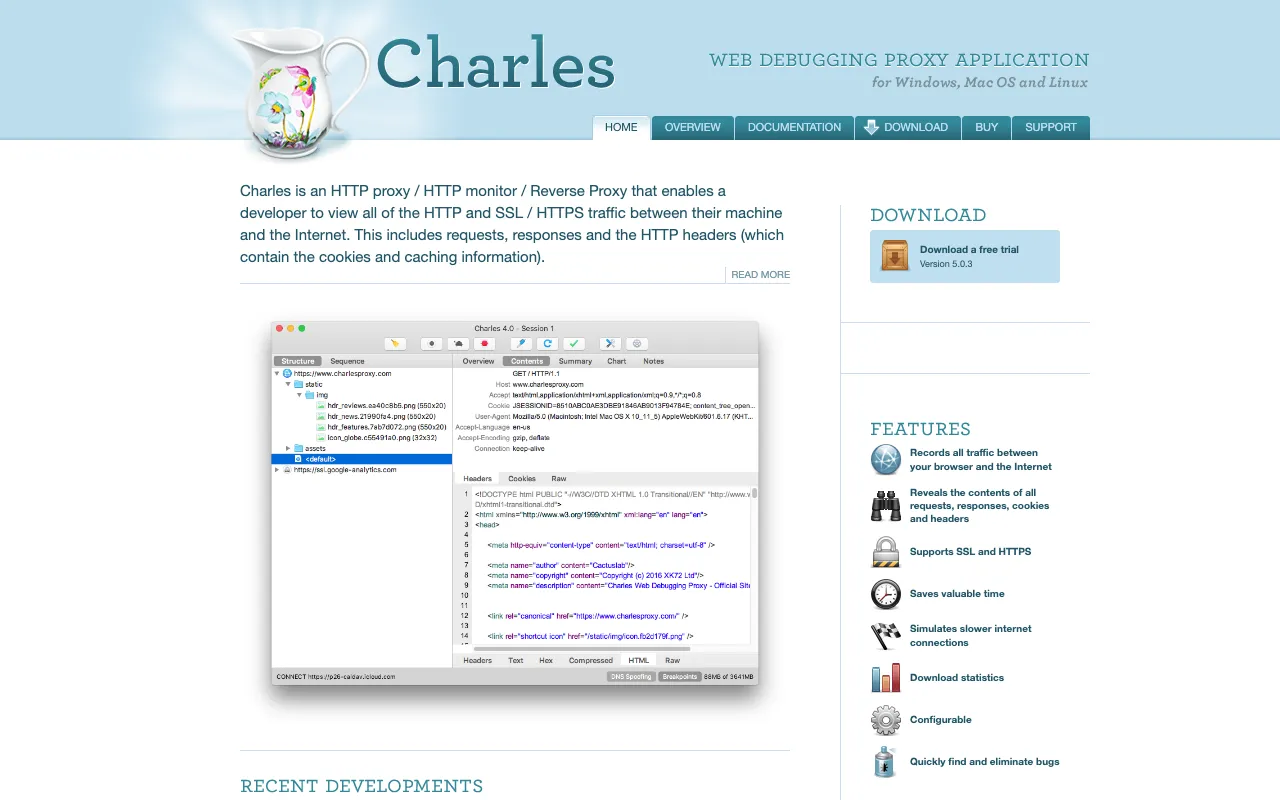
Charles Proxy – The Ultimate Web Debugging Proxy for QA Testers
Charles Proxy is the industry-standard web debugging proxy trusted by QA professionals worldwide. It acts as an intermediary between your browser or mobile device and the internet, allowing you to see, record, and manipulate every single HTTP and HTTPS request and response. For QA testers, this visibility is critical for validating API calls, diagnosing performance bottlenecks, testing error handling, and ensuring data security compliance. With its intuitive UI and powerful features like breakpoints, throttling, and SSL proxying, Charles Proxy transforms complex debugging tasks into manageable, visual workflows.
What is Charles Proxy?
Charles Proxy is a desktop application that functions as a man-in-the-middle proxy for debugging web and mobile application traffic. Its core purpose is to provide complete visibility into the network communication of any application running on your machine or connected devices. For QA testers, it's an indispensable tool that goes beyond simple logging; it enables active testing by allowing you to modify requests on the fly, simulate different network conditions, and validate that applications behave correctly under various scenarios. It supports a wide range of protocols and is essential for testing modern web apps, mobile apps, and microservices architectures.
Key Features of Charles Proxy
SSL Proxying & HTTPS Decryption
Charles Proxy can decrypt and inspect HTTPS traffic, which is essential for modern web security. It installs its own root certificate on your machine, allowing you to see the contents of encrypted requests and responses. This is a non-negotiable feature for QA testers who need to verify that sensitive data is properly encrypted in transit and that API payloads are correct.
Breakpoints and Repeat Requests
Intercept any request or response before it is sent or received. You can pause the transaction, modify headers, body data, or status codes, and then continue. This is perfect for testing edge cases, error responses, and application logic without needing to change backend code. The 'Repeat' feature lets you replay a request multiple times for load testing or debugging intermittent issues.
Bandwidth Throttling and Latency Simulation
Simulate real-world network conditions like slow 3G, congested WiFi, or high-latency connections. This allows QA testers to validate application performance and user experience under suboptimal network speeds, ensuring the app remains functional and provides appropriate loading states or timeouts.
Structured Request/Response View
Traffic is automatically formatted for readability. JSON, XML, and other data formats are presented in a tree view with syntax highlighting. Image resources are previewed inline. This saves QA testers immense time compared to parsing raw logs, enabling quick validation of data structures and content.
Map Local and Remote Tools
Redirect requests from a live environment to a local file or development server. This is crucial for testing new features or bug fixes in isolation before they are deployed. QA can test updated API endpoints or frontend assets without interfering with other team members or needing complex staging setups.
Who Should Use Charles Proxy?
Charles Proxy is a must-have tool for any professional involved in software quality assurance, testing, or development. It is particularly valuable for: **QA Engineers & Testers** validating API contracts and integration points; **Mobile App Testers** debugging communication between native apps and their backends; **Performance Testers** analyzing network waterfalls and optimizing load times; **Security-minded Testers** checking for data leakage in HTTP requests; and **Frontend Developers** debugging AJAX calls and single-page applications. It bridges the gap between client-side behavior and server-side logic, making it essential for end-to-end testing.
Charles Proxy Pricing and Free Tier
Charles Proxy offers a fully-functional free trial. After the trial period, it requires a paid license for continued use. Licensing is per-user and is available as a one-time purchase with optional upgrade plans. The free trial provides complete access to all features, making it an excellent way for QA teams to evaluate its fit for their workflow. The investment is quickly justified by the dramatic reduction in debugging time and increased test coverage it enables.
Common Use Cases
- Debugging and validating REST API and GraphQL calls for QA testers
- Testing mobile application network traffic and offline behavior simulation
- Identifying performance bottlenecks by analyzing request timings and sequences
- Security testing by inspecting HTTPS traffic for sensitive data exposure
- Mocking API responses for testing application error handling and edge cases
Key Benefits
- Drastically reduces time spent diagnosing frontend-backend integration issues.
- Provides undeniable evidence (traffic logs) for bug reports, improving developer handoff.
- Empowers QA testers to perform advanced tests without writing code or waiting for dev environments.
- Improves application quality by enabling validation of all network-dependent functionality.
Pros & Cons
Pros
- Unmatched visibility into encrypted (HTTPS) traffic, which is critical for modern apps.
- Intuitive user interface that makes complex network debugging accessible.
- Powerful manipulation features like breakpoints and mapping for active testing.
- Excellent support for both web and mobile app testing scenarios.
- Industry-standard tool with extensive community knowledge and resources.
Cons
- Requires a paid license after the initial trial period, which is an upfront cost.
- Initial setup for SSL proxying on mobile devices and some systems requires configuration.
- Primarily a desktop application, so it's tied to a single machine for recording sessions.
Frequently Asked Questions
Is Charles Proxy free to use?
Charles Proxy offers a fully-featured free trial. After the trial expires, you must purchase a license for continued use. There is no permanently free version, but the trial provides ample opportunity to evaluate all its capabilities.
Is Charles Proxy good for QA testers?
Absolutely. Charles Proxy is considered one of the best tools for QA testers working on web and mobile applications. Its ability to visualize, record, and manipulate network traffic is fundamental for API testing, performance validation, and debugging issues that are only visible in the communication layer between client and server.
Can Charles Proxy debug mobile app traffic?
Yes, Charles Proxy excels at mobile app testing. By configuring your mobile device to use your computer running Charles as a proxy, you can capture and inspect all HTTP/HTTPS traffic from iOS or Android applications, which is invaluable for testing native and hybrid mobile apps.
How does Charles Proxy handle HTTPS traffic?
Charles Proxy uses SSL Proxying. It acts as a "man-in-the-middle" by generating dynamic certificates for sites you visit. You must install Charles's root certificate into your device's trust store. Once configured, it can decrypt, display, and modify HTTPS traffic, a process that is secure within your local debugging environment.
Conclusion
For QA testers committed to delivering robust, high-performance applications, Charles Proxy is not just a tool—it's a force multiplier. It provides the critical layer of visibility between user interface and backend services that traditional testing tools often miss. By enabling detailed inspection and manipulation of network traffic, it elevates QA from passive validation to active investigation and discovery of complex bugs. While it requires a license, the efficiency gains, improved test coverage, and clearer bug reports it enables make Charles Proxy an essential and justifiable investment for any serious QA professional or development team.