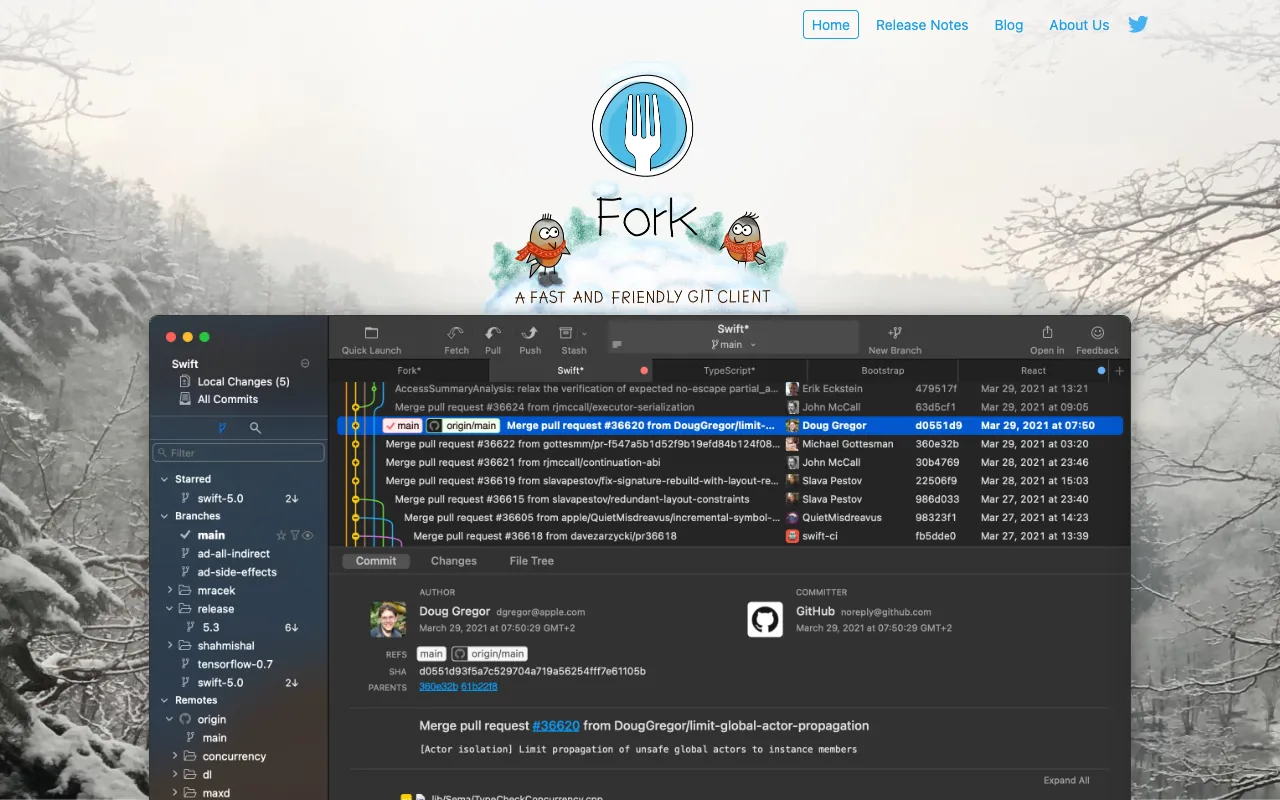
Fork – The Best Git Client for Software Engineers
Fork is a premium desktop Git client engineered for developers who demand speed, clarity, and control in their version control workflow. Available for macOS and Windows, it transforms complex Git operations into intuitive visual tasks, making repository management faster and more efficient. Whether you're working on solo projects or collaborating within large teams, Fork provides the performance and usability that modern software engineering requires.
What is the Fork Git Client?
Fork is a dedicated Git graphical user interface (GUI) built from the ground up for performance and developer experience. It goes beyond basic commit and push operations, offering a comprehensive suite of tools for managing branches, reviewing history, resolving merge conflicts, and collaborating with team members. Its core philosophy is to reduce friction in the Git workflow, allowing engineers to focus on writing code rather than memorizing command-line syntax. It serves as a powerful alternative to command-line Git and other GUI clients, prioritizing responsiveness and a clean, distraction-free interface.
Key Features of Fork
Blazing Fast Performance
Fork is optimized for speed, ensuring operations like fetching, committing, and browsing history are nearly instantaneous, even in large repositories with extensive commit histories. This eliminates waiting time and keeps developers in a state of flow.
Intuitive and Clean User Interface
The interface is designed for clarity, presenting repository status, branch graphs, and file diffs in a visually logical way. This reduces cognitive load and makes complex branching strategies easy to understand at a glance.
Powerful Merge Conflict Resolver
Fork includes a sophisticated, built-in merge tool that visually highlights conflicts and provides a streamlined interface for resolving them. You can compare changes side-by-side and choose which edits to keep, making merge resolution less error-prone.
Submodule and Repository Management
Easily manage projects with submodules directly from the GUI. Fork simplifies the process of updating and synchronizing nested repositories, which is often cumbersome on the command line.
Integrated Git Flow Support
Fork has native support for Git Flow workflows, allowing you to initialize repositories with Git Flow, create feature/hotfix/release branches, and finish them with correctly sequenced merges through simple menu actions.
Who Should Use Fork?
Fork is ideal for professional software engineers, development teams, and tech leads who regularly use Git and want a more efficient visual management tool. It's perfect for developers transitioning from the command line who seek a GUI for complex operations, teams adopting Git Flow, and anyone frustrated with the sluggishness or complexity of other Git clients. Its cross-platform availability makes it a great choice for organizations with mixed macOS and Windows environments.
Fork Pricing and Free Trial
Fork is a paid desktop application with a one-time purchase license per platform (macOS or Windows). It does not operate on a subscription model. The developers offer a fully-featured, free trial period so you can evaluate the tool thoroughly within your own workflow before deciding to purchase. After the trial, a license must be purchased for continued use. Visit the official website for the most current pricing and licensing details.
Common Use Cases
- Visualizing complex Git branch history and relationships for legacy codebases
- Streamlining code reviews by visually comparing changes and commit histories before merging
- Managing Git submodules in large monorepo or microservices architectures efficiently
Key Benefits
- Accelerates daily Git operations, saving developers hours per week on repository management
- Reduces errors in merging and branching through clear visual confirmation and guided workflows
- Improves onboarding for new team members by making repository history and structure transparent
Pros & Cons
Pros
- Exceptional performance and responsiveness with large repositories
- User interface is clean, modern, and highly intuitive for both beginners and experts
- Powerful built-in tools for merging, diffing, and submodule management eliminate the need for external apps
- One-time purchase model provides long-term value without recurring subscription fees
Cons
- Requires a paid license after the trial period with no permanent free tier
- Currently available only as a desktop application for macOS and Windows (no web or Linux version)
- Advanced automation may still require occasional command-line Git usage for edge cases
Frequently Asked Questions
Is Fork Git Client free to use?
Fork offers a full-featured free trial for evaluation. After the trial period, a one-time paid license is required for continued use on each platform (macOS or Windows). There is no permanently free version.
Is Fork a good Git client for software engineering teams?
Absolutely. Fork is an excellent choice for engineering teams. Its speed, clear visualization of branches, and integrated merge conflict resolver enhance collaboration, reduce merge errors, and make complex repository histories understandable for all team members, improving overall development velocity.
Can I use Fork with GitHub, GitLab, or Bitbucket?
Yes, Fork works seamlessly with any remote Git hosting service, including GitHub, GitLab, Bitbucket, and Azure DevOps. You can clone repositories, push/pull changes, and manage pull requests directly through its interface.
How does Fork compare to command-line Git or other GUI clients like GitKraken or Sourcetree?
Fork distinguishes itself with a primary focus on raw performance and a minimalist, intuitive UI. It often performs faster than competitors, especially on large repos. Compared to the command line, it provides superior visualization for branching strategies and history. Its one-time license can be more cost-effective than subscription-based competitors for individual developers.
Conclusion
For software engineers seeking a high-performance, reliable, and intuitive Git GUI, Fork stands out as a top-tier solution. Its commitment to speed, a clean user experience, and powerful built-in tools addresses the core pain points of modern version control. While it requires a purchase after its trial, the productivity gains and reduction in workflow friction offer significant return on investment for individual developers and teams alike. If you value a fast, focused tool that gets out of your way and lets you manage your code with confidence, Fork is an outstanding choice for your development toolkit.