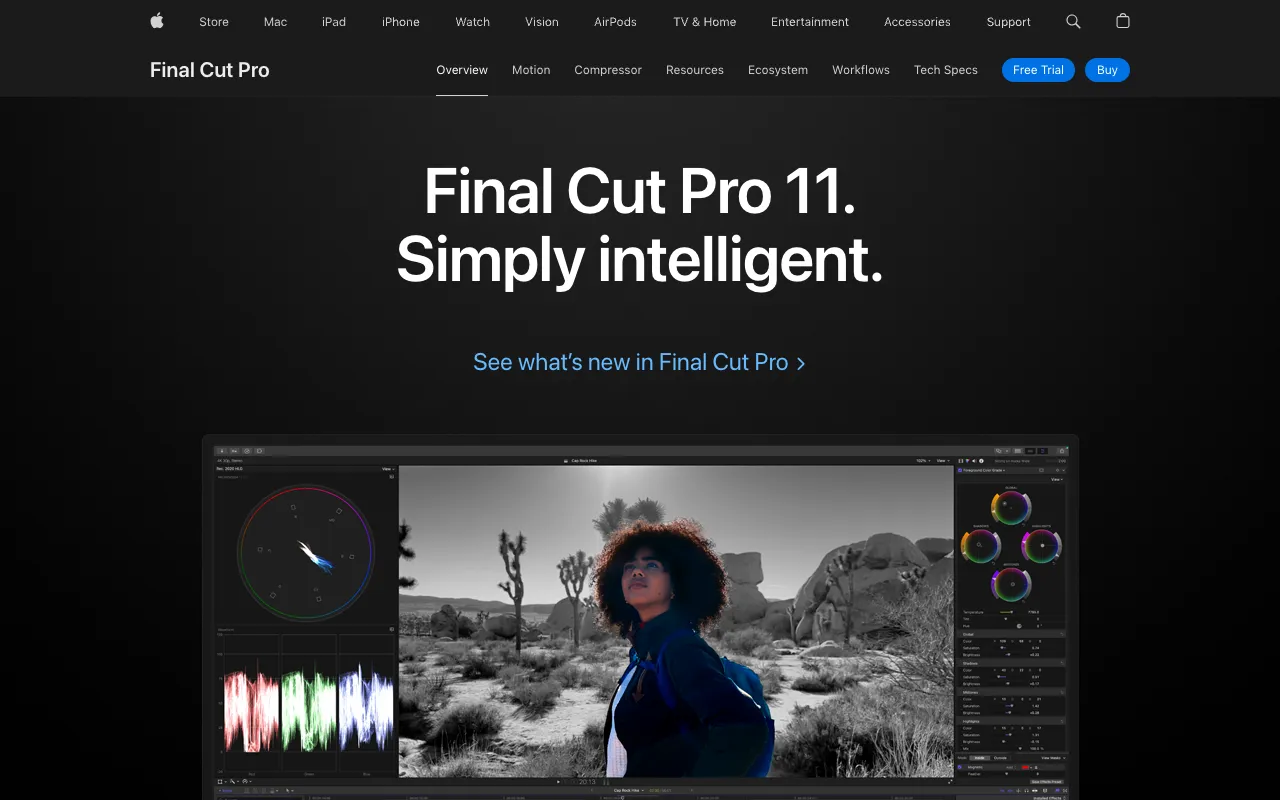
Final Cut Pro – Professional Video Editing Software for macOS
Final Cut Pro represents the pinnacle of professional video editing for the macOS ecosystem. As Apple's flagship non-linear editing software, it delivers unparalleled performance, precision, and creative freedom for filmmakers, video editors, and content creators. Built exclusively for Mac, it leverages Apple hardware for exceptional speed with 8K video, complex effects, and multi-cam projects. Whether you're editing feature films, documentaries, YouTube content, or corporate videos, Final Cut Pro provides a complete post-production suite that streamlines workflows from ingest to final delivery.
What is Final Cut Pro?
Final Cut Pro is a professional, non-linear video editing application developed by Apple for macOS. It's designed for editors who demand speed, flexibility, and power in their post-production workflow. Unlike subscription-based competitors, Final Cut Pro utilizes a one-time purchase model, providing lifetime access to updates. Its core philosophy revolves around a magnetic timeline that eliminates clip collisions and track management headaches, allowing editors to focus on storytelling rather than technical logistics. It supports virtually every professional video format, including ProRes RAW, HDR, and immersive 360° video, making it a versatile tool for any video production pipeline.
Key Features of Final Cut Pro
Magnetic Timeline
The revolutionary Magnetic Timeline redefines the editing experience by using trackless, magnetic clips. This eliminates sync issues and accidental overwrites, allowing you to experiment freely. Compound clips, connected clips, and roles keep your project organized while maintaining incredible editing fluidity.
Pro Performance with Apple Silicon
Final Cut Pro is optimized for M-series Apple Silicon chips, delivering breathtaking performance. It can play back and edit multiple streams of 8K ProRes video in real time without rendering, thanks to hardware acceleration. Background rendering ensures you can keep working without interruption.
Advanced Color Grading & HDR
Featuring powerful color grading tools, including color wheels, curves, and hue/saturation curves, Final Cut Pro rivals dedicated grading software. It offers full support for HDR workflows with Dolby Vision, HDR10, and HLG, allowing you to grade and deliver stunning high dynamic range content.
Professional Audio Editing
With support for 3D spatial audio for Apple Vision Pro, surround sound, and a comprehensive set of audio roles, Final Cut Pro handles professional audio mixing. The built-in noise removal, voice isolation, and EQ tools ensure your audio matches the quality of your visuals.
Who Should Use Final Cut Pro?
Final Cut Pro is ideal for video professionals and serious creators invested in the Apple ecosystem. It's the go-to choice for independent filmmakers, documentary editors, YouTubers producing high-end content, marketing teams creating video ads, and corporate video producers. Its balance of professional power and intuitive design also makes it excellent for advanced hobbyists looking to elevate their work. If you edit on a Mac and work with formats from iPhone footage to cinema cameras, Final Cut Pro provides a streamlined, powerful environment.
Final Cut Pro Pricing and Free Trial
Final Cut Pro is available for a one-time purchase of $299.99 USD from the Mac App Store. This includes all future updates at no additional cost, a significant value compared to subscription models. Apple offers a generous 90-day free trial, allowing you to fully test the software with all features enabled before committing. There is no ongoing subscription or free tier, but the one-time license provides lifetime access. Educational institutions can purchase it at a discounted rate through the Apple Education Store.
Common Use Cases
- Editing documentary films with multi-cam interviews and archival footage
- Producing high-end YouTube videos and online content with dynamic graphics
- Color grading and finishing commercial video projects in HDR
Key Benefits
- Unmatched editing speed and real-time performance on Apple Silicon Macs
- One-time purchase eliminates monthly fees, providing long-term value
- Streamlined workflow from shoot to delivery with integrated professional tools
Pros & Cons
Pros
- Industry-leading performance optimized for macOS and Apple Silicon
- Intuitive Magnetic Timeline speeds up the editing process
- No subscription required; one-time purchase includes free updates
- Excellent color grading and HDR workflow integration
- Superb stability and reliability for professional deadlines
Cons
- Exclusive to macOS, not available for Windows or Linux users
- One-time cost has a higher initial barrier than some free editors
- Project file sharing with Avid or Premiere Pro users can require conversion
Frequently Asked Questions
Is Final Cut Pro free to use?
No, Final Cut Pro is not free. It requires a one-time purchase of $299.99. However, Apple provides a full-featured 90-day free trial so you can evaluate it thoroughly before buying.
Is Final Cut Pro good for professional video editors?
Absolutely. Final Cut Pro is an industry-standard tool used by professional filmmakers, broadcasters, and content creators worldwide. Its performance, color grading suite, audio tools, and format support meet the demands of high-end professional video production.
Can I use Final Cut Pro on a Windows PC?
No, Final Cut Pro is developed exclusively for macOS and is only available on Apple Mac computers. It cannot be installed or run on Windows or any other operating system.
What is the difference between Final Cut Pro and iMovie?
iMovie is Apple's free, consumer-level video editor with basic tools, perfect for simple home movies. Final Cut Pro is the professional counterpart, offering advanced features like multi-cam editing, 3D titles, professional color grading, motion graphics templates, and support for high-end codecs like ProRes RAW—catering to filmmakers and professional creators.
Conclusion
Final Cut Pro stands as a top-tier investment for any video editor committed to the Mac platform. Its combination of raw performance—especially on Apple Silicon—innovative editing mechanics like the Magnetic Timeline, and a comprehensive professional toolset makes it a compelling alternative to subscription-based editors. For creators seeking a powerful, reliable, and cost-effective long-term solution for professional video editing, Final Cut Pro delivers exceptional value and creative capability, solidifying its place as one of the best tools for video editors on macOS.