Go back
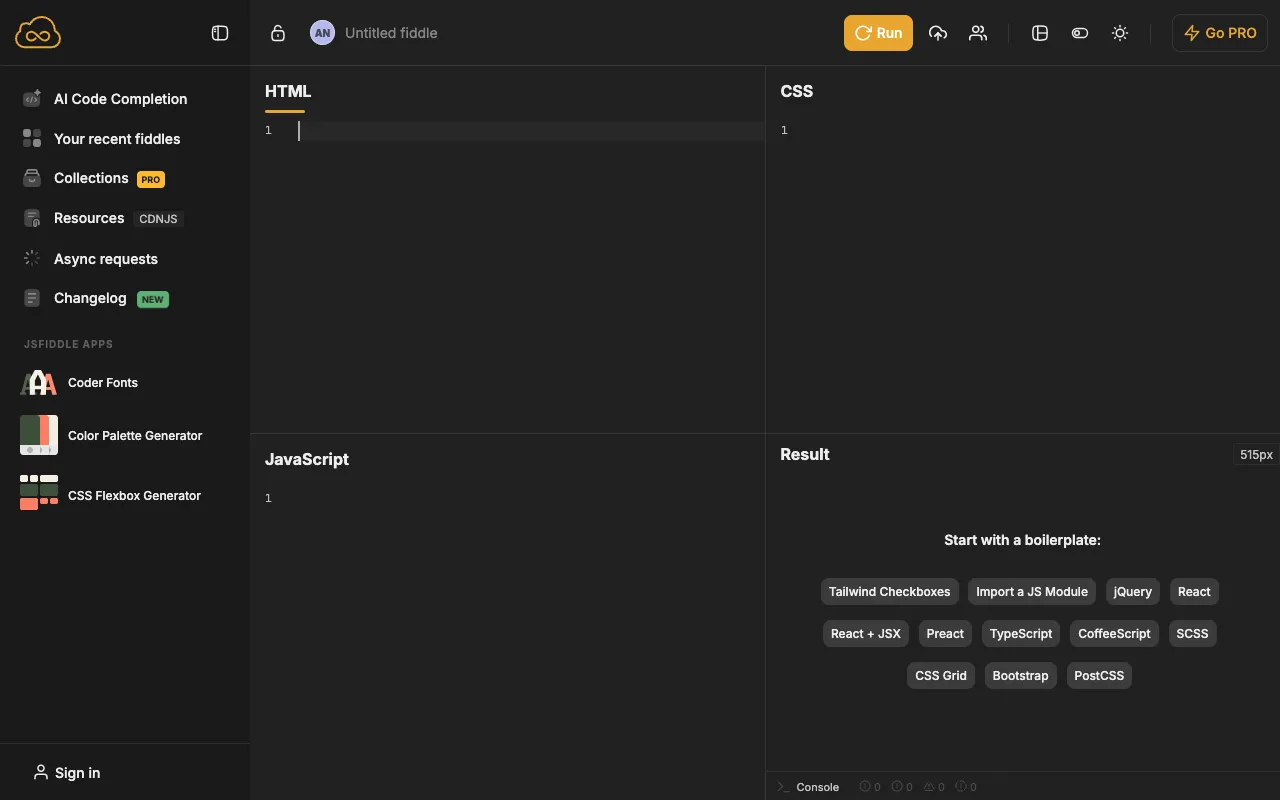
Image of JSFiddle – The Premier Online Code Playground for Web Developers

JSFiddle – The Premier Online Code Playground for Web Developers

JSFiddle is the original and most trusted online code editor for front-end web developers. Serving as a live sandbox and collaborative workspace, it eliminates environment setup, allowing you to write, execute, and debug HTML, CSS, and JavaScript code instantly. Whether you're prototyping a new UI component, testing a bug fix, or creating a shareable demo, JSFiddle accelerates your workflow and fosters community learning.

What is JSFiddle?

JSFiddle is a cloud-based Integrated Development Environment (IDE) specifically designed for front-end web technologies. It provides a self-contained panel system where developers can write HTML, CSS, and JavaScript code separately, see the live visual output, and access browser developer tools—all within a single browser tab. More than just a tool, it's a thriving community where developers share 'fiddles' (code snippets) to ask questions, demonstrate solutions, and showcase creative work, making it an indispensable resource for learning and collaboration.

Key Features of JSFiddle

Live Preview & Instant Execution

See your code changes render in real-time as you type. JSFiddle's live preview panel updates instantly, providing immediate visual feedback which is crucial for debugging and iterative design. There's no need to save, refresh, or deploy—just code and see the results.

Multi-Panel Code Editor

Organize your work logically with dedicated, resizable panels for HTML, CSS, and JavaScript. This separation mirrors standard project structure, supports syntax highlighting, and allows you to focus on one language at a time while managing dependencies and frameworks easily.

Collaboration & Sharing

Share your work with a single, persistent URL. You can create public 'fiddles' to get help on Stack Overflow, demonstrate a concept to a colleague, or embed a live example in documentation. The platform's fork functionality lets others build upon your code, fostering collaborative problem-solving.

Framework & Library Support

Quickly integrate popular JavaScript libraries and CSS frameworks like React, Vue, jQuery, Bootstrap, and Tailwind CSS via a convenient dropdown menu. This feature saves time on configuration and CDN setup, letting you focus on building and testing with your tools of choice.

Who Should Use JSFiddle?

JSFiddle is essential for front-end developers, full-stack engineers, UI/UX designers who code, educators, and students. It's perfect for developers who need to quickly test a hypothesis, create a minimal reproducible example for a bug report, prototype a user interface component, or teach a web development concept with a live, interactive example. It's also widely used in technical interviews and online coding communities for sharing solutions.

JSFiddle Pricing and Free Tier

JSFiddle operates on a generous freemium model. The core functionality—creating, running, and sharing public code snippets—is completely free with no sign-up required. This makes it accessible to everyone. For professional and team use, JSFiddle offers paid plans (like 'Collaborator') which include private fiddles, real-time collaborative editing, version history, and increased customization, providing a more robust environment for commercial or sensitive projects.

Common Use Cases

Key Benefits

Pros & Cons

Pros

  • Zero setup time—start coding in seconds directly from your browser.
  • Ideal for creating Minimal, Complete, and Verifiable Examples (MCVEs) for bug reports and Stack Overflow questions.
  • Fosters a massive public repository of learning examples and solutions.
  • Intuitive, distraction-free interface focused purely on front-end code execution.

Cons

  • Primarily focused on front-end code; not suited for back-end or server-side logic testing.
  • Free tier fiddles are public, which may not be suitable for proprietary or confidential code.
  • Lacks advanced IDE features like full project management, git integration, or complex build processes found in desktop IDEs.

Frequently Asked Questions

Is JSFiddle completely free to use?

Yes, the core functionality of JSFiddle is completely free. You can create, run, and share public code snippets without any cost or account registration. Paid plans are available for teams and professionals needing private fiddles and advanced collaboration features.

Is JSFiddle good for collaborative coding?

Absolutely. JSFiddle is excellent for collaboration. Sharing is as simple as sending a URL. For real-time, multi-user editing similar to Google Docs, you would need a paid 'Collaborator' plan. Its public nature makes it perfect for open community help, code reviews, and educational demonstrations.

How does JSFiddle compare to CodePen?

JSFiddle is often seen as the more utilitarian, 'developer-focused' tool, excellent for debugging and technical demonstrations. CodePen offers a stronger emphasis on design, aesthetics, and community discovery. Both are excellent; JSFiddle's simplicity and speed make it a favorite for pure, functional code testing and sharing in developer forums.

Conclusion

For over a decade, JSFiddle has remained the go-to online sandbox for web developers who value speed, simplicity, and effective collaboration. It solves the fundamental need to test code instantly and share it effortlessly. While not a replacement for a full-featured desktop IDE for large projects, it is an indispensable companion tool for prototyping, debugging, teaching, and community engagement. For any web developer looking to streamline their workflow and tap into a global knowledge base, mastering JSFiddle is a highly recommended investment.