Go back
Image of Webpack – The Essential JavaScript Module Bundler

Webpack – The Essential JavaScript Module Bundler

Webpack stands as the cornerstone of modern JavaScript development, transforming how developers build, optimize, and deploy complex web applications. As a powerful static module bundler, it intelligently processes your application's modules and dependencies—JavaScript, CSS, images, and fonts—creating highly optimized bundles ready for production. Trusted by developers worldwide, Webpack solves the critical challenge of managing dependencies and asset delivery in today's component-driven web.

What is Webpack?

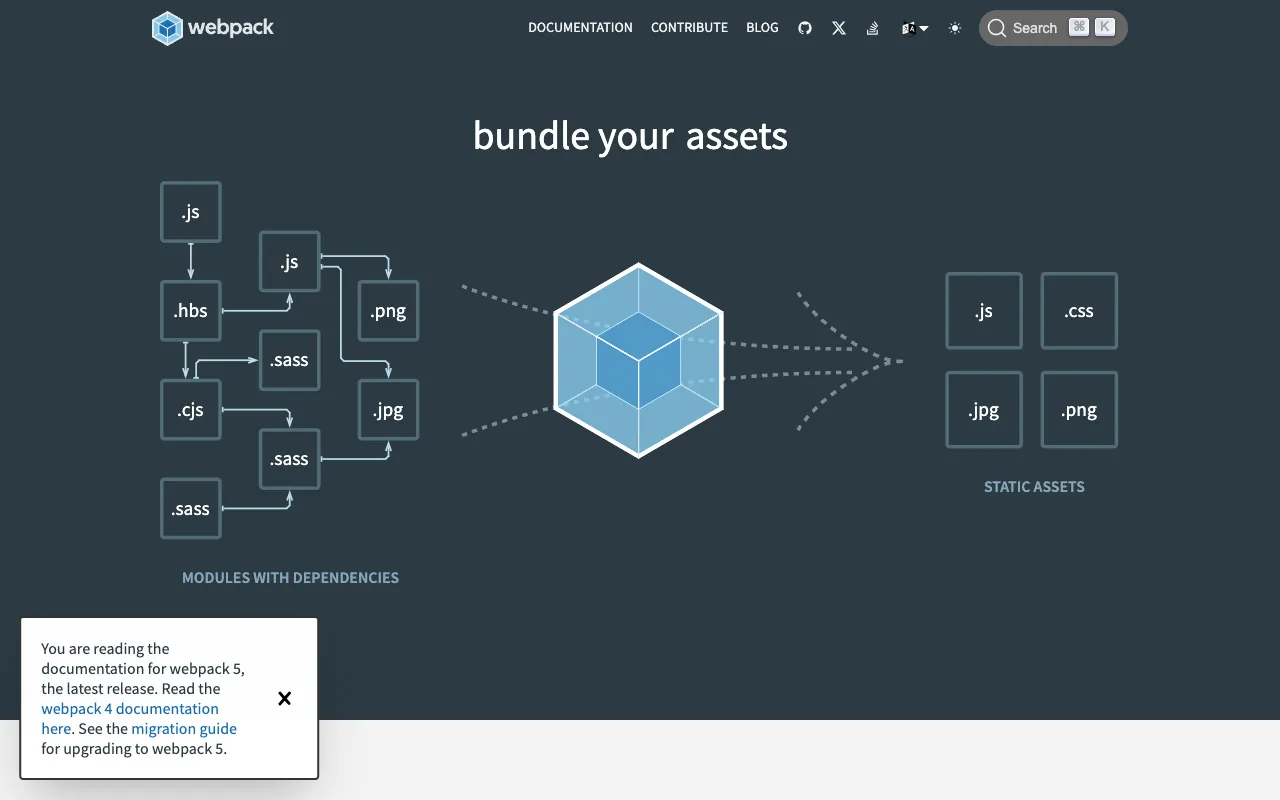
Webpack is a free, open-source static module bundler specifically designed for modern JavaScript applications. At its core, it analyzes your project's dependency graph, starting from a defined entry point, and recursively bundles every module your app needs into one or more optimized output files. It transcends simple concatenation by offering a powerful ecosystem of 'loaders' and 'plugins' that can transform, minify, split, and optimize code and assets. This makes it the de facto build tool for frameworks like React, Vue, and Angular, handling complex scenarios from code splitting and lazy loading to hot module replacement for a superior development experience.

Key Features of Webpack

Dependency Graph & Module Bundling

Webpack builds an internal dependency graph mapping every module (ES6, CommonJS, AMD) and asset your application requires. This intelligent mapping allows it to generate highly efficient bundles, eliminating dead code and ensuring only necessary modules are included in the final payload sent to the browser.

Loaders for Asset Transformation

Transform any file type into valid modules that Webpack can process. Use loaders to compile TypeScript to JavaScript, Sass/SCSS to CSS, inline images as data URLs, or optimize SVGs. This feature turns Webpack into a central hub for all your front-end assets.

Powerful Plugin System

Extend Webpack's core functionality with plugins that perform a wider range of tasks. Plugins can optimize chunks, inject environment variables, generate HTML files, compress assets, and enable advanced features like Hot Module Replacement (HMR) for instant feedback during development.

Code Splitting & Lazy Loading

Dramatically improve your application's initial load time by splitting your code into multiple bundles that can be loaded on demand. This allows you to lazy-load routes or features only when the user needs them, a critical technique for building large-scale, performant Single Page Applications (SPAs).

Production Optimization

Webpack includes a dedicated production mode that minifies JavaScript, optimizes CSS, removes development-only code, and performs tree shaking to eliminate unused exports. This results in the smallest possible bundle sizes for faster page loads and better user experience.

Who Should Use Webpack?

Webpack is indispensable for front-end developers, full-stack engineers, and development teams building modern, complex web applications. It is the ideal choice for developers working with component-based frameworks (React, Vue, Angular), teams requiring robust build processes for enterprise applications, and anyone needing to manage and optimize a large codebase with numerous dependencies. If your project involves JavaScript modules, CSS preprocessors, static assets, and requires performance optimization for production, Webpack provides the necessary foundation.

Webpack Pricing and Free Tier

Webpack is completely free and open-source software released under the MIT license. There is no paid tier, enterprise license, or premium version. Its entire feature set—from module bundling and code splitting to the extensive plugin ecosystem—is available at zero cost. Development and maintenance are supported by a vibrant community of contributors and sponsors, ensuring it remains a freely accessible, powerful tool for developers everywhere.

Common Use Cases

Key Benefits

Pros & Cons

Pros

  • Industry-standard tool with massive community support and extensive documentation
  • Highly configurable and extensible via loaders and plugins for virtually any use case
  • Powerful optimization features like tree shaking and minification built-in for production
  • Integrates seamlessly with all major front-end frameworks and development tools

Cons

  • Configuration can be complex and intimidating for beginners or simple projects
  • Build times can become slow for very large projects without careful optimization

Frequently Asked Questions

Is Webpack free to use?

Yes, Webpack is completely free and open-source. There are no fees, licenses, or paid tiers. All its powerful features for bundling, optimizing, and transforming code are available under the permissive MIT license.

Is Webpack good for modern web development?

Absolutely. Webpack is considered an essential tool for modern web development. It is the backbone of build processes for major frameworks like React and Vue, enabling critical practices such as code splitting, lazy loading, and hot reloading that are necessary for building fast, scalable, and maintainable web applications.

What is the difference between Webpack and Vite?

Webpack is a powerful, highly configurable bundler optimized for production. Vite is a newer build tool that uses native ES modules for faster development server startup. Webpack offers more maturity, a vast plugin ecosystem, and deep optimization controls, making it ideal for complex, large-scale applications. The choice often depends on project complexity and team preference.

Do I need Webpack for a simple website?

For a very simple, static website with minimal JavaScript, you might not need a complex tool like Webpack. However, if your site uses JavaScript modules, npm packages, CSS preprocessors, or requires performance optimizations like minification, Webpack provides a structured and professional approach even for smaller projects.

Conclusion

Webpack remains the definitive solution for managing the complexity of modern JavaScript applications. Its unparalleled flexibility, powerful optimization capabilities, and robust plugin ecosystem make it more than just a bundler—it's a complete asset pipeline and build system. While the learning curve for configuration exists, the payoff in application performance, developer experience, and maintainable code architecture is immense. For any serious web development project aiming for production-grade quality, Webpack is not just a tool; it's a fundamental pillar of the development workflow.