Go back
Image of PEStudio – The Ultimate Static Analysis Tool for Cybersecurity Experts

PEStudio – The Ultimate Static Analysis Tool for Cybersecurity Experts

PEStudio is a powerful, specialized desktop application designed for cybersecurity professionals who need to perform in-depth static analysis on Windows Portable Executable (PE) files. It goes beyond simple scanning, providing a comprehensive forensic environment to detect malware, identify suspicious indicators, and understand the intricate structure of executables without running them. Trusted by incident responders, malware analysts, and reverse engineers, PEStudio transforms raw binary data into actionable intelligence for threat assessment and security research.

What is PEStudio?

PEStudio is a dedicated static analysis software for Windows, focused exclusively on the Portable Executable (PE) file format—the standard for executables, DLLs, and drivers on the Windows operating system. Unlike dynamic analysis tools that run code in a sandbox, PEStudio examines the file's metadata, headers, imports, exports, resources, and strings without execution. This makes it an essential first line of defense for identifying potentially malicious files safely, analyzing packers or obfuscators, and conducting preliminary triage during security investigations. It serves as a critical bridge between automated antivirus scanners and deep-dive reverse engineering in tools like IDA Pro or Ghidra.

Key Features of PEStudio

Comprehensive PE File Header Analysis

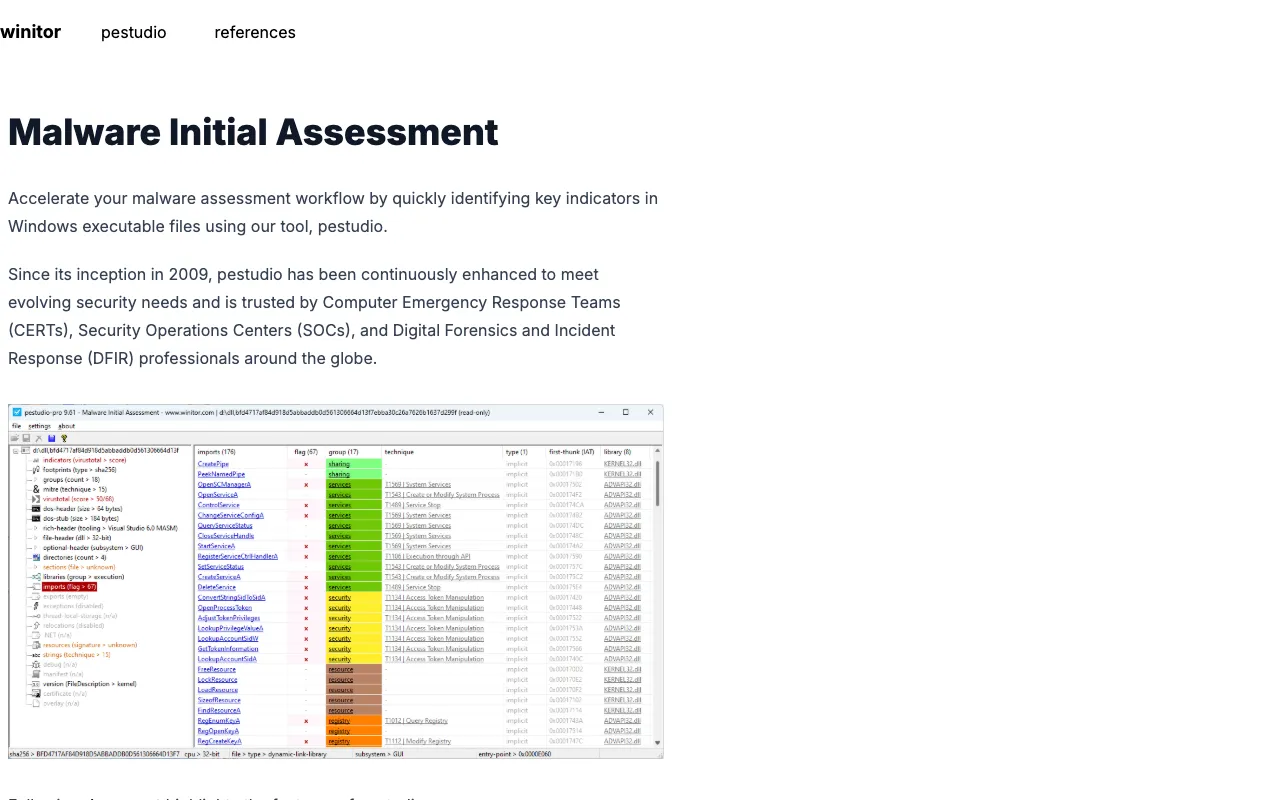
PEStudio provides a detailed, human-readable breakdown of the DOS header, NT headers, file headers, and optional headers. This allows experts to spot anomalies like unusual entry points, mismatched section characteristics, or timestamps that might indicate compilation on a non-standard system—common red flags in malware.

Malware Indicator Database (VirusTotal & Intezer)

The tool integrates with external threat intelligence. It can query VirusTotal for reputation scores and Intezer for code similarity, automatically highlighting files with known malicious signatures. This contextualizes your analysis within the global threat landscape.

Deep Import/Export and Dependency Analysis

See every DLL and API function a file intends to use. PEStudio flags high-risk imports associated with malware (e.g., process injection, persistence, anti-debugging) and visualizes dependency graphs, helping you understand a binary's capabilities and potential intent before it runs.

Advanced String and Resource Investigation

Extract and analyze embedded strings, URLs, IP addresses, and file paths. PEStudio applies heuristics to find obfuscated strings and examines resource sections for icons, dialogs, or embedded binaries—often where malware hides secondary payloads or configuration data.

YARA Rule Integration and Custom Detection Logic

For power users, PEStudio supports YARA, the industry-standard pattern-matching language. You can create, import, and run custom YARA rules to hunt for specific malware families, tools, or techniques, tailoring the analysis to your unique threat intelligence requirements.

Who Should Use PEStudio?

PEStudio is indispensable for security roles that require hands-on binary analysis. Malware Analysts use it for initial triage and indicator extraction. Incident Responders leverage it to quickly assess malicious files discovered during a breach. Reverse Engineers employ it to understand a binary's structure before deep disassembly. Threat Hunters utilize its YARA and intelligence integrations to scan for known-bad patterns. Digital Forensics Experts rely on it for static artifact analysis. It is also a valuable educational tool for students and aspiring security professionals learning about the PE format and malware analysis fundamentals.

PEStudio Pricing and Free Tier

PEStudio offers a robust, fully-featured free version for personal and commercial use, making advanced static analysis accessible to everyone. The free tier includes all core analysis features: header inspection, import/export analysis, string extraction, and basic indicator highlighting. For professionals and organizations requiring enhanced capabilities, a paid license unlocks advanced features like the integrated VirusTotal and Intezer lookup API, detailed reporting in XML/JSON formats, and priority support. This freemium model ensures students and individual researchers can build skills while enterprises can deploy a licensed version for automated, intelligence-driven workflows.

Common Use Cases

Key Benefits

Pros & Cons

Pros

  • Specialized, in-depth focus on the Windows PE format unmatched by generic tools
  • Powerful freemium model with a fully-functional free version for all users
  • Integrates directly with major threat intelligence platforms (VirusTotal, Intezer)
  • User-friendly interface that presents complex binary data in an organized, actionable way
  • Supports extensibility through YARA rules for custom detection logic

Cons

  • Exclusively designed for Windows PE files, not for analyzing binaries from other OSes like Linux or macOS
  • Advanced features like automated API lookups require a paid license
  • Being a static analysis tool, it cannot detect runtime behaviors or packed code that only reveals itself when executed

Frequently Asked Questions

Is PEStudio free to use?

Yes, PEStudio has a powerful free version that includes all essential static analysis features for personal and commercial use. A paid license is available for advanced features like automated VirusTotal lookups and detailed reporting formats.

Is PEStudio good for malware analysis?

Absolutely. PEStudio is a premier tool for static malware analysis. It is specifically designed to help cybersecurity experts detect malicious indicators in Windows executables, analyze file structure, extract IOCs like suspicious imports and strings, and integrate with threat intelligence, making it a cornerstone of modern malware analysis workflows.

Can PEStudio analyze files other than .exe?

Yes. While focused on the Portable Executable format, PEStudio can analyze any file using the PE structure. This includes not only .exe files but also Dynamic Link Libraries (.dll), driver files (.sys), Control Panel applets (.cpl), and other PE-compliant binaries critical to the Windows operating system.

How does PEStudio compare to running strings or dumpbin?

PEStudio provides a far superior, integrated analysis environment compared to command-line tools like `strings` or `dumpbin`. It aggregates and correlates all information—headers, imports, strings, resources—into a single GUI, applies threat intelligence context, flags suspicious items automatically, and supports YARA rules, dramatically increasing analyst efficiency and depth of insight.

Conclusion

For cybersecurity professionals engaged in the critical work of dissecting Windows executables, PEStudio is not just a tool—it's an essential extension of your analytical capabilities. Its unmatched specialization in the PE format, combined with a thoughtful freemium model and deep threat intelligence integrations, positions it as the definitive choice for static analysis. Whether you're triaging a potential malware sample, preparing for reverse engineering, or hunting for threats across your network, PEStudio provides the clarity, context, and control needed to turn binary files into understood threats. For any security toolkit focused on Windows environments, PEStudio is a non-negotiable component.